Open Source · AI-Powered Command Center

Stop Reacting.
Start Commanding.

Laya enriches your daily workflows with AI — whether you connect one platform or many. It researches context, drafts responses, and delivers ready-to-approve action cards before you even open the app.

Open source. Local-first. Works with one platform or many. Your API keys, your data.

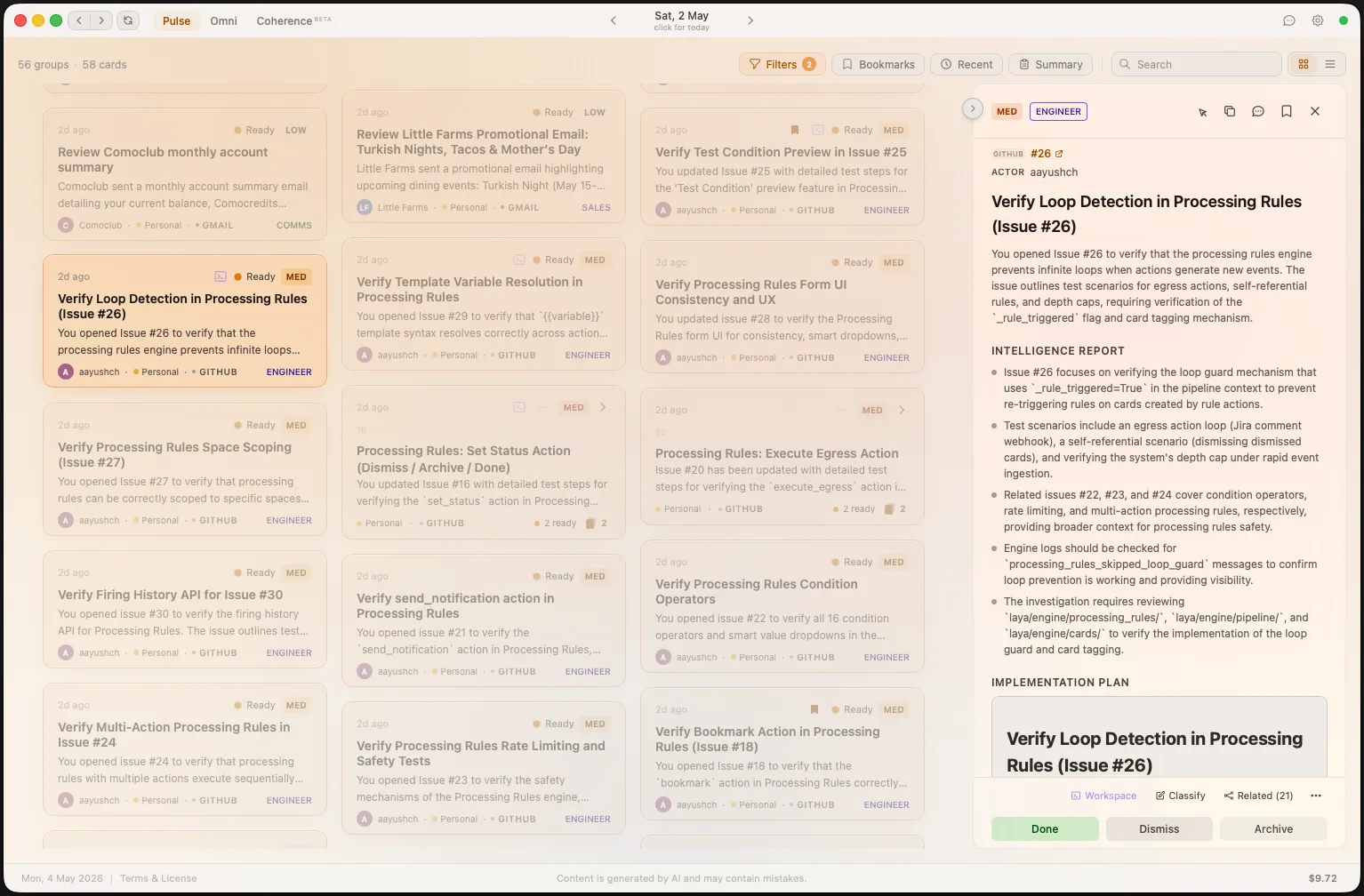
Laya Card View — grouped action cards in 3-column grid with intelligence reports
9+
Platform Integrations
6
AI Personas
10-Stage
Intelligence Pipeline
100%
Open Source & Local-First

Your workflow is broken.

Whether you juggle eight tools or just an overflowing inbox — every notification demands attention and none of them come with context.

Without Laya

  • Open Slack notification. No context. Search Jira for the ticket. Open Bitbucket for the PR. Piece together what happened. 15 minutes gone.
  • Miss a critical email buried under 40 promotional messages you need to manually triage.
  • Start your morning with 30 minutes of "catching up" — reading threads, checking calendars, reviewing PRs.
  • Context-switch 50+ times per day between tools. Each switch costs 23 minutes of focus.

With Laya

  • Open Laya. AI already researched the context, cross-referenced the ticket, found related PRs, and drafted a response. One click to approve.
  • AI intelligence reports flag the recruitment email as legitimate, auto-archives 39 promotional ones, surfaces what matters.
  • Daily briefing synthesizes overnight activity into Events, Action Items, and Key Updates — ready at 7 AM.
  • One unified feed. Every platform. Every notification pre-processed with intelligence. Zero context switching.

Intelligence, not notifications.

Every card Laya delivers has already been researched, classified, and prepared for action.

Intelligence Reports

Every notification gets an AI-generated intelligence report. Sender reputation, cross-platform context, pattern recognition from your history, and actionable insights — all before you read a single word.

Pre-Drafted Actions

Draft replies, code fixes, briefing summaries — ready for one-click approval. The AI does the work. You just say "go" or refine the details.

Daily Briefings

Wake up to an AI-synthesized morning briefing. Events & meetings, action items, key updates — organized by priority across all your spaces.

Coding Agents

Run coding agents (Claude Code, Gemini CLI, Codex) directly from any card. Watch them work in real-time and guide their actions from the workspace.

Smart Classification

Every event is automatically categorized by persona (Engineer, Comms, Ops, Finance, HR, Sales), priority (Critical to Low), and category — using a multi-model AI pipeline that learns from your corrections.

Spaces

Organize your life into separate contexts — Work, Personal, side projects. Each space has its own sources, model configs, and API keys.

Coherence Search

Search for any entity across all platforms and trace its full lifecycle — from Jira ticket to PR to Slack thread. AI-generated narratives tell the complete story.

Cross-Platform Composer

Execute outbound actions from a single interface — send emails, post Slack messages, comment on tickets, and more. AI-assisted drafting with full preview before sending.

Bookmarks

Bookmark important cards for quick access. Filter your feed to show only bookmarked items — no matter the date or status.

Omni

A rolling cross-platform summary that answers "where am I right now?" at a glance. Four temporal layers — from items needing attention to long-term milestones — compressed by AI.

Context Association

Automatically links related cards across platforms using semantic similarity and LLM confirmation. Learns from your link/unlink corrections to improve grouping accuracy over time.

Agent Studio

Launch a fully configured agent session from any card. Choose your runtime, set an execution mode, configure directories, and write detailed prompts — with Plan or Accept Edits modes for full control.

Budget Tracking

Monitor LLM costs broken down by feature (Pulse, Omni, Chat, Coherence) and pipeline step. Set monthly spending caps with automatic pause when limits are reached.

How Laya works

A multi-stage AI pipeline transforms raw notifications into ready-to-approve intelligence.

Ingest

Events flow in from Gmail, Slack, Jira, GitHub, Calendar — connect as many or as few as you need.

Route & Classify

Fast AI classifies priority, category, persona, and builds a research plan.

Research & Draft

Specialized workers research context, draft replies, spawn coding agents, gather intelligence.

Deliver

Polished action cards land in your feed with intelligence reports and one-click actions.

Intelligence

Every card comes pre-researched

Laya doesn't just forward notifications. It investigates them. Each card includes an AI intelligence report with cross-platform context and pattern-matched history.

  • Sender reputation and domain verification
  • Cross-referenced past events from memory
  • Tracking link analysis and safety flags
  • Confidence scoring on every classification
Laya intelligence report showing sender analysis and cross-platform context
Views

Your feed, your way

Switch between list view for rapid triage or card view for visual scanning. Sort by newest, priority, category, or platform. Context-grouped cards cluster related items automatically.
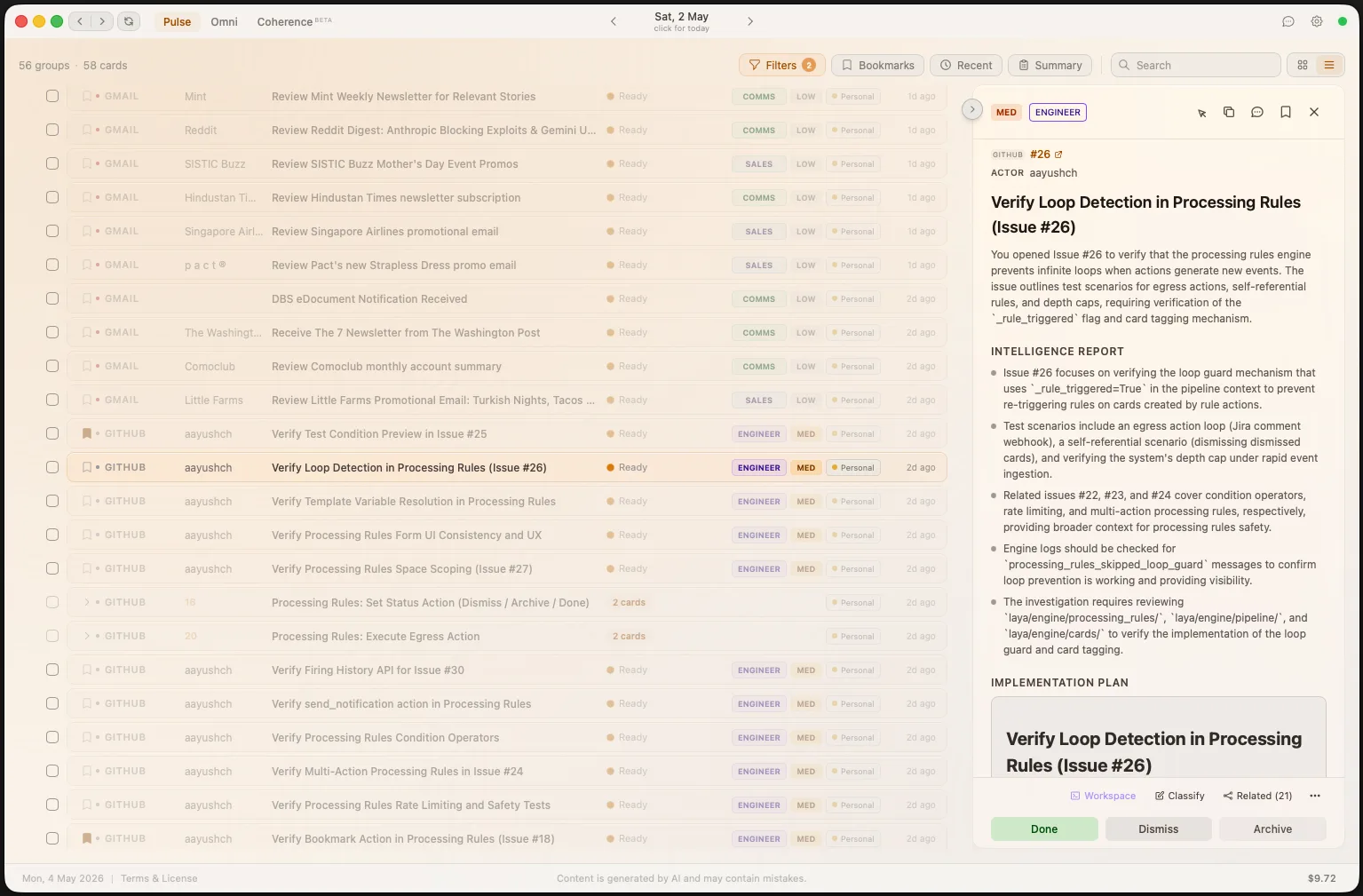
  • List and Card view modes with context grouping
  • Filter by status, priority, category, space
  • Bulk actions — approve, dismiss, archive
Laya list view showing multiple view options
Briefings

Your morning, already organized

Every morning, Laya synthesizes overnight activity across all your platforms into a structured briefing. Events, action items, and key updates — prioritized and ready.
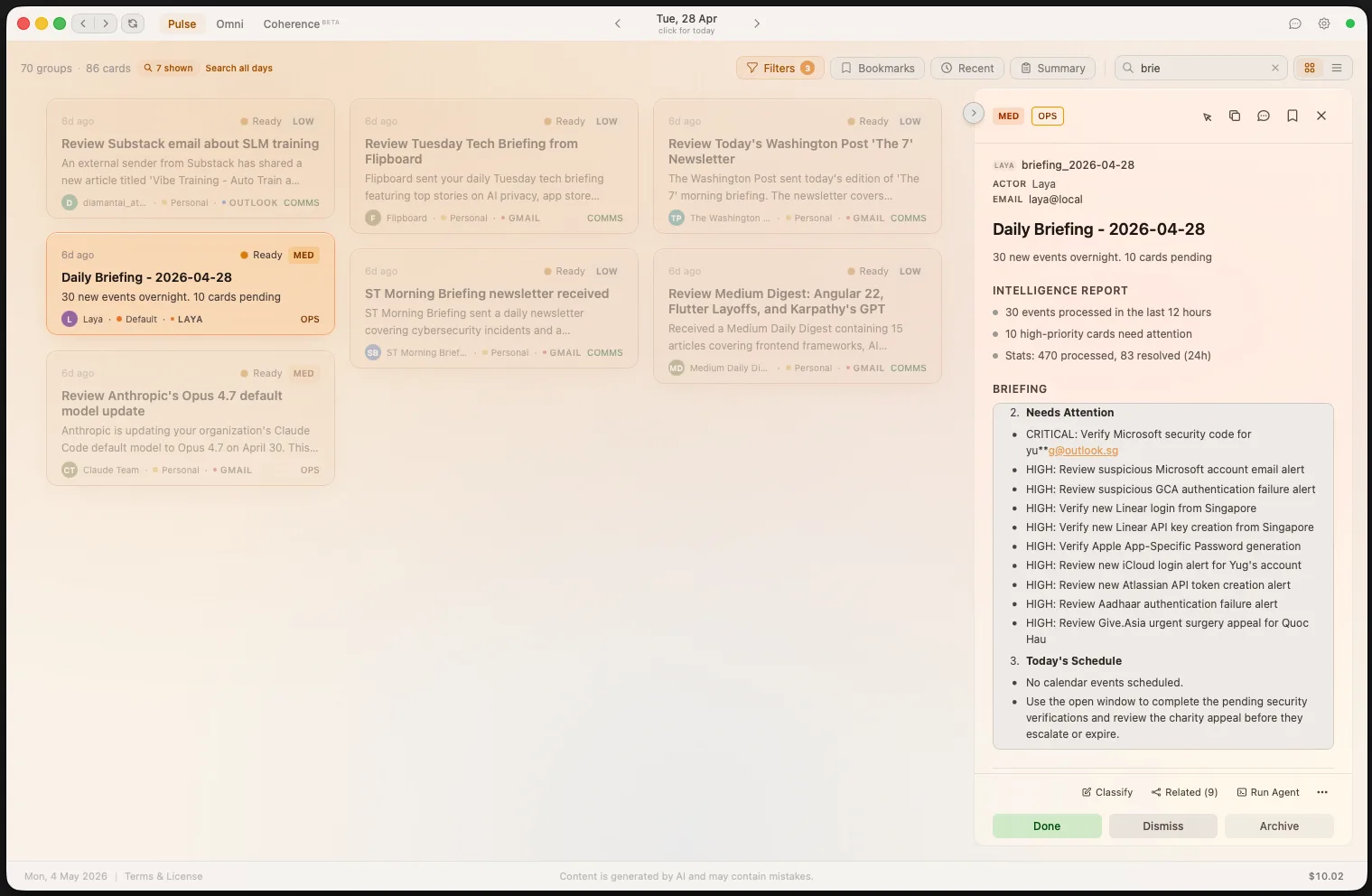
  • Automated daily synthesis at your preferred time
  • Events & meetings with context
  • Action items ranked by priority
  • Key updates filtered from noise
Laya daily briefing showing events, action items, and key updates
Summary

Your day at a glance

The Day Summary distills your entire day into a single structured view. Action items with pending counts, key updates filtered from noise, and space-level breakdowns — all generated and updated automatically.
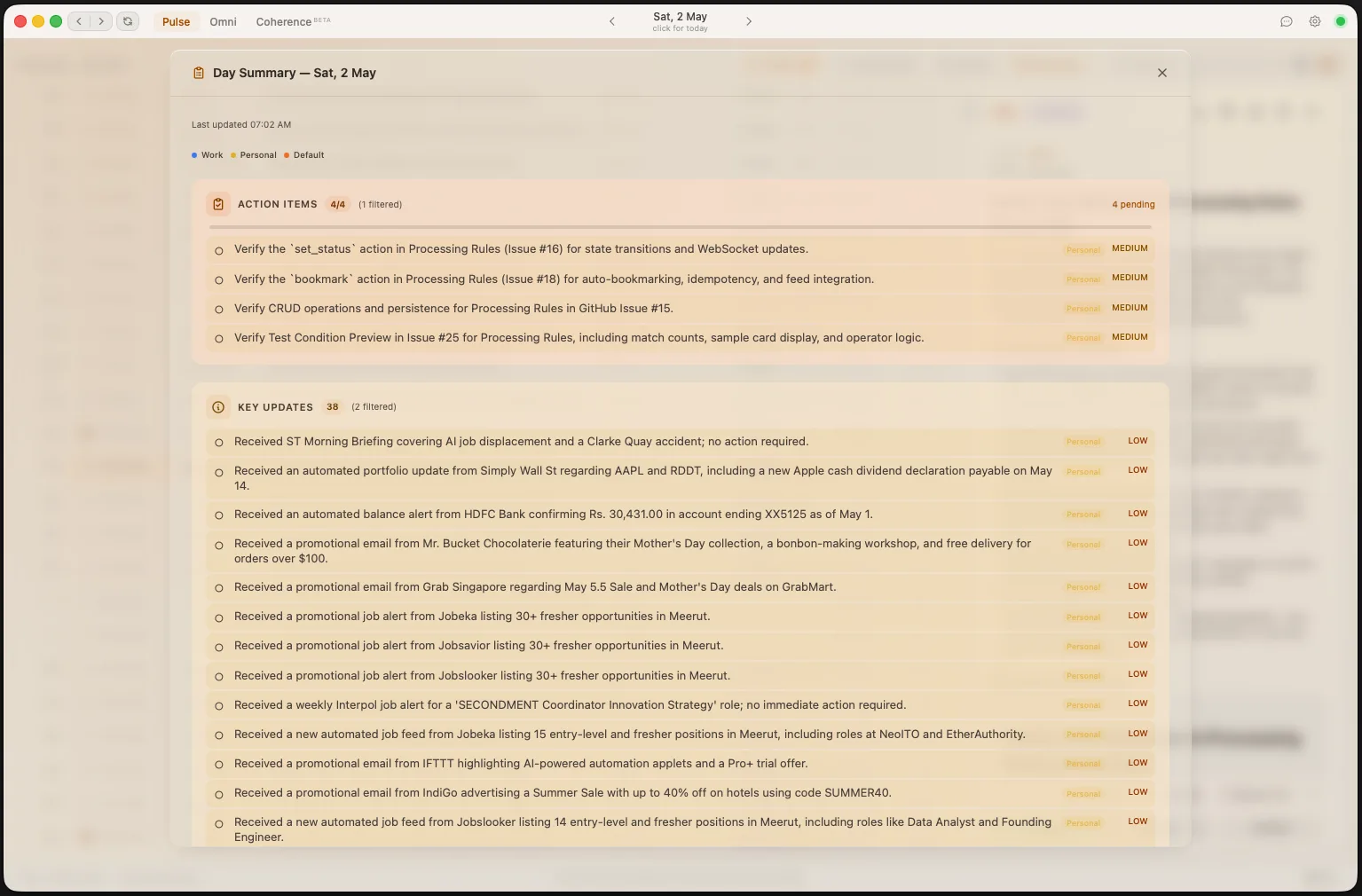
  • Action items with pending status and priority
  • Key updates from all connected platforms
  • Space-level breakdown for multi-context workflows
Laya Day Summary — structured view of action items and key updates
Workspace

A full workspace for every agent session

Run coding agents — Claude Code, Gemini CLI, or Codex — directly from any card in your feed. Each session gets a dedicated workspace with a live timeline, context panel, and generated files.
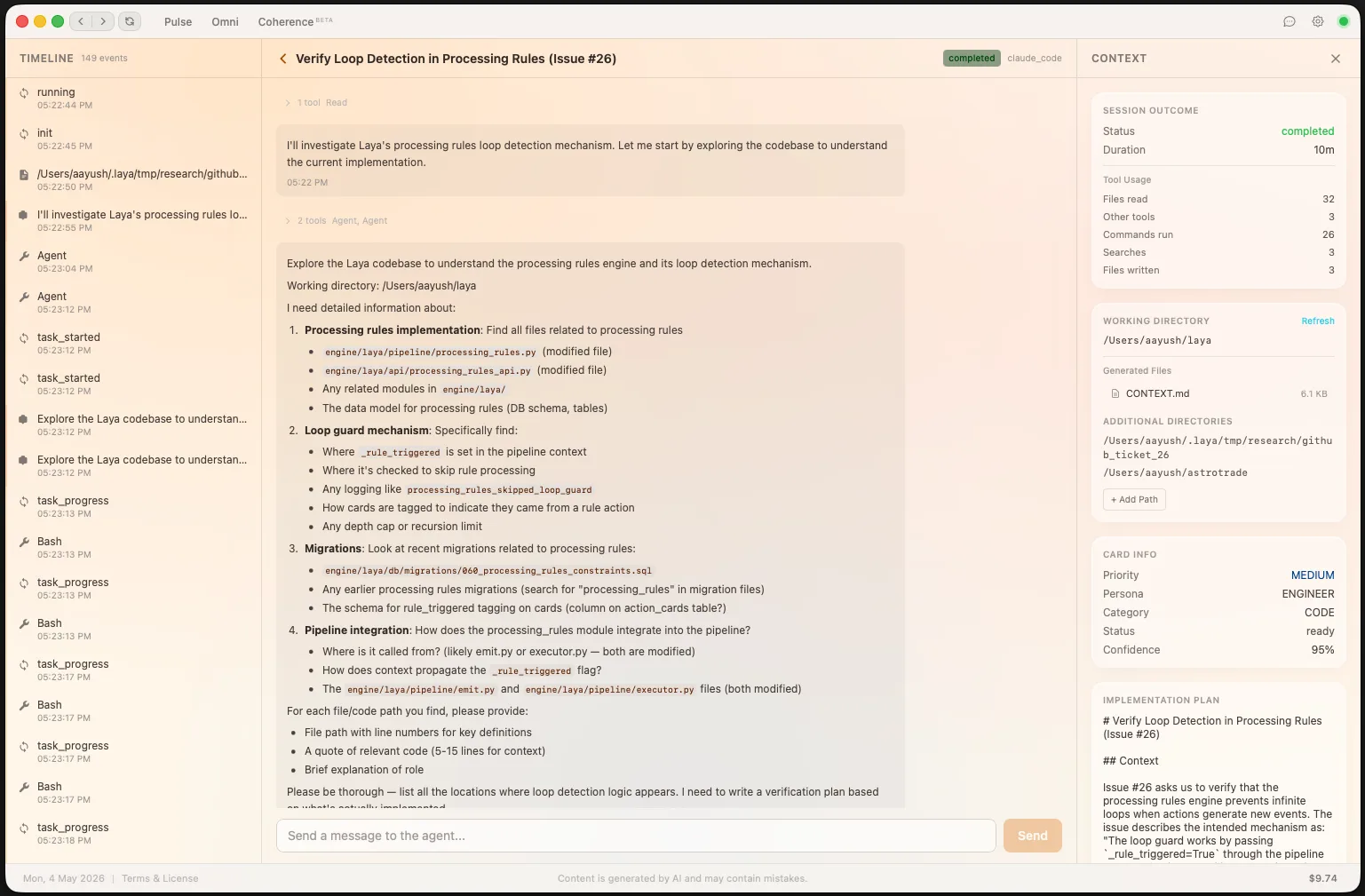
  • Run an agent from any card with a single click
  • Live timeline of agent actions, tool calls, and progress
  • Full context panel with card info, implementation plan, and related entities
  • Interactive messaging — guide, question, or redirect mid-session
Laya agent workspace — full workspace with timeline, context panel, and agent output
Chat

Ask anything about your data

Laya's built-in chat uses semantic search across all your ingested events. Ask natural language questions and get instant, context-rich answers — with links back to the original cards and events.
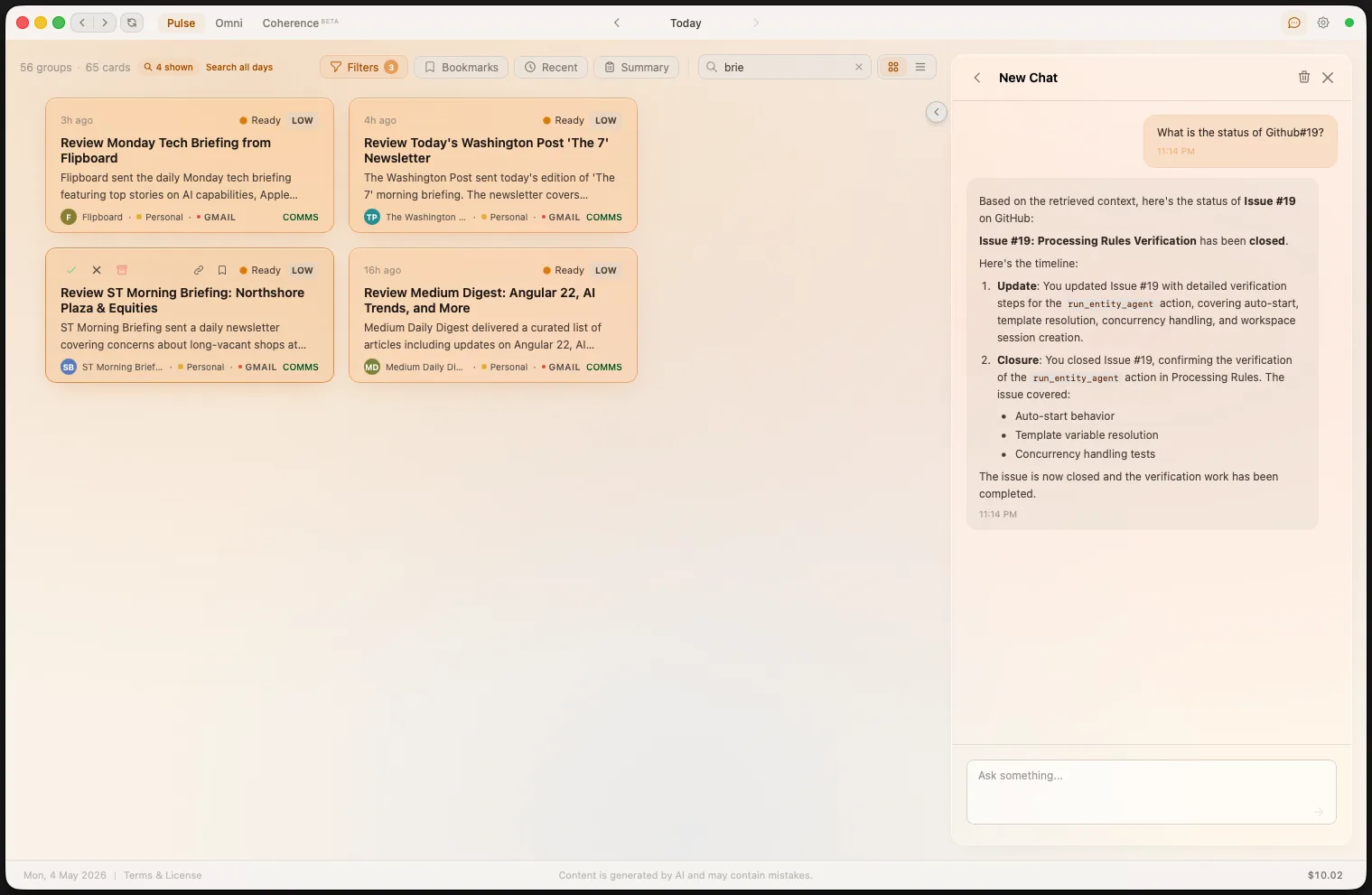
  • Semantic search across all platforms and events
  • Natural language queries — no filters needed
  • Direct links to related cards and action items
  • RAG-powered retrieval from your local data
Laya chat with semantic search — ask natural language questions about your data
Omni

Your big picture, always current

Omni is a rolling cross-platform summary that synthesizes all your professional activity into a single unified view. It answers "where am I right now?" — especially powerful after time away or for sprint retrospectives.
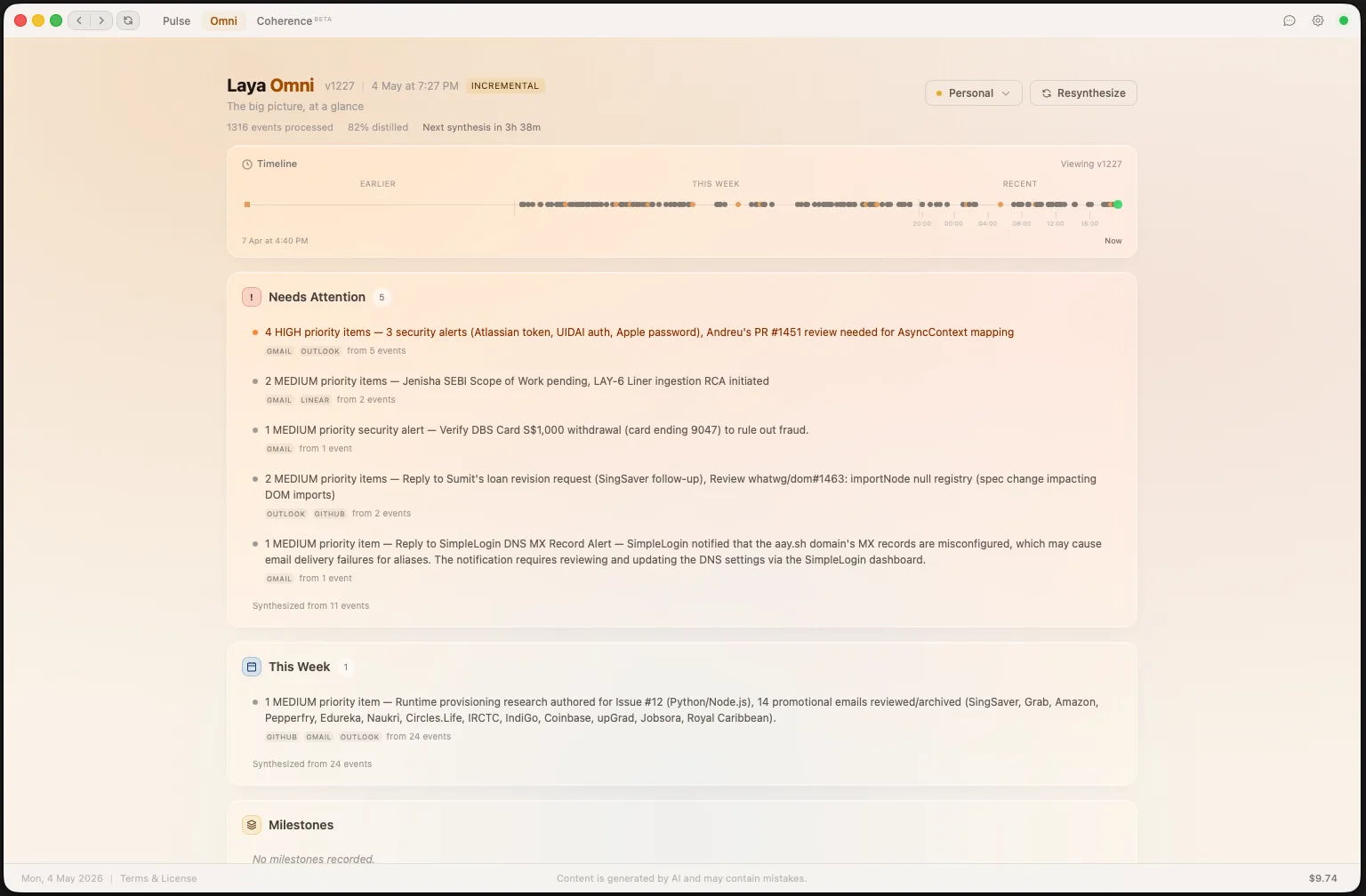
  • Four temporal layers: Attention, Recent, Period, and Milestone
  • Progressive summarization — older layers compress automatically
  • Pin important items so they survive compression
  • Time-travel slider to view previous snapshots
Laya Omni — rolling cross-platform summary with progressive summarization
Coherence

Trace any entity across every platform

Coherence is Laya's cross-platform entity search. Search for a person, ticket, PR, or project and see its complete lifecycle — every event, every platform, one chronological story.
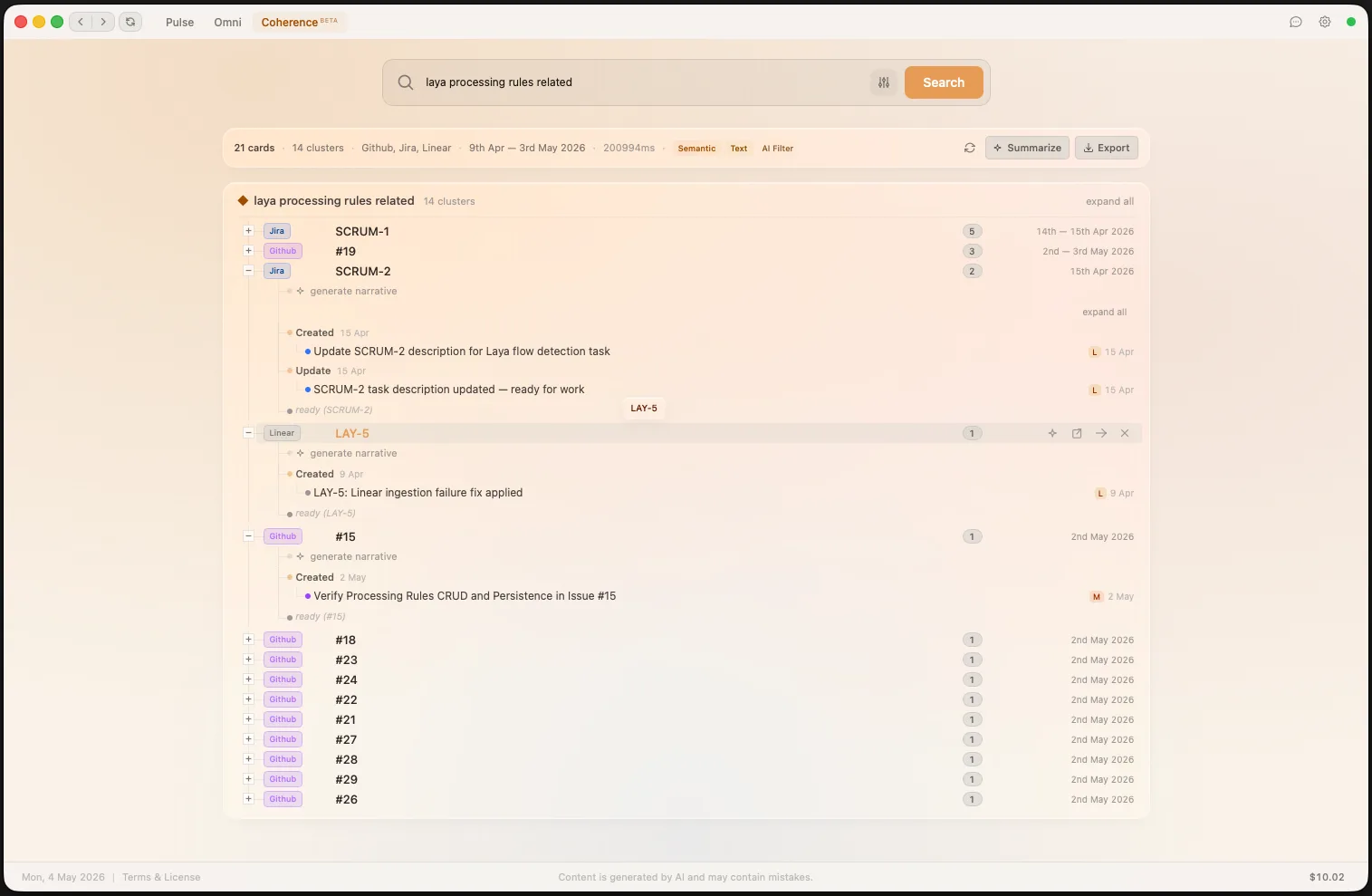
  • Semantic + fuzzy + entity search merged via Reciprocal Rank Fusion
  • Auto-clustered by entity relationships
  • AI-generated narrative with chapter detection
  • Export traces as markdown, save and rerun later
Laya Coherence — trace entities across platforms with AI-generated narratives
Context Association

Related cards, automatically linked

Laya's context association engine uses semantic similarity and LLM confirmation to automatically group cards that belong to the same real-world context — even across different platforms and entity types. Link or unlink groups manually, and Laya learns from every correction.
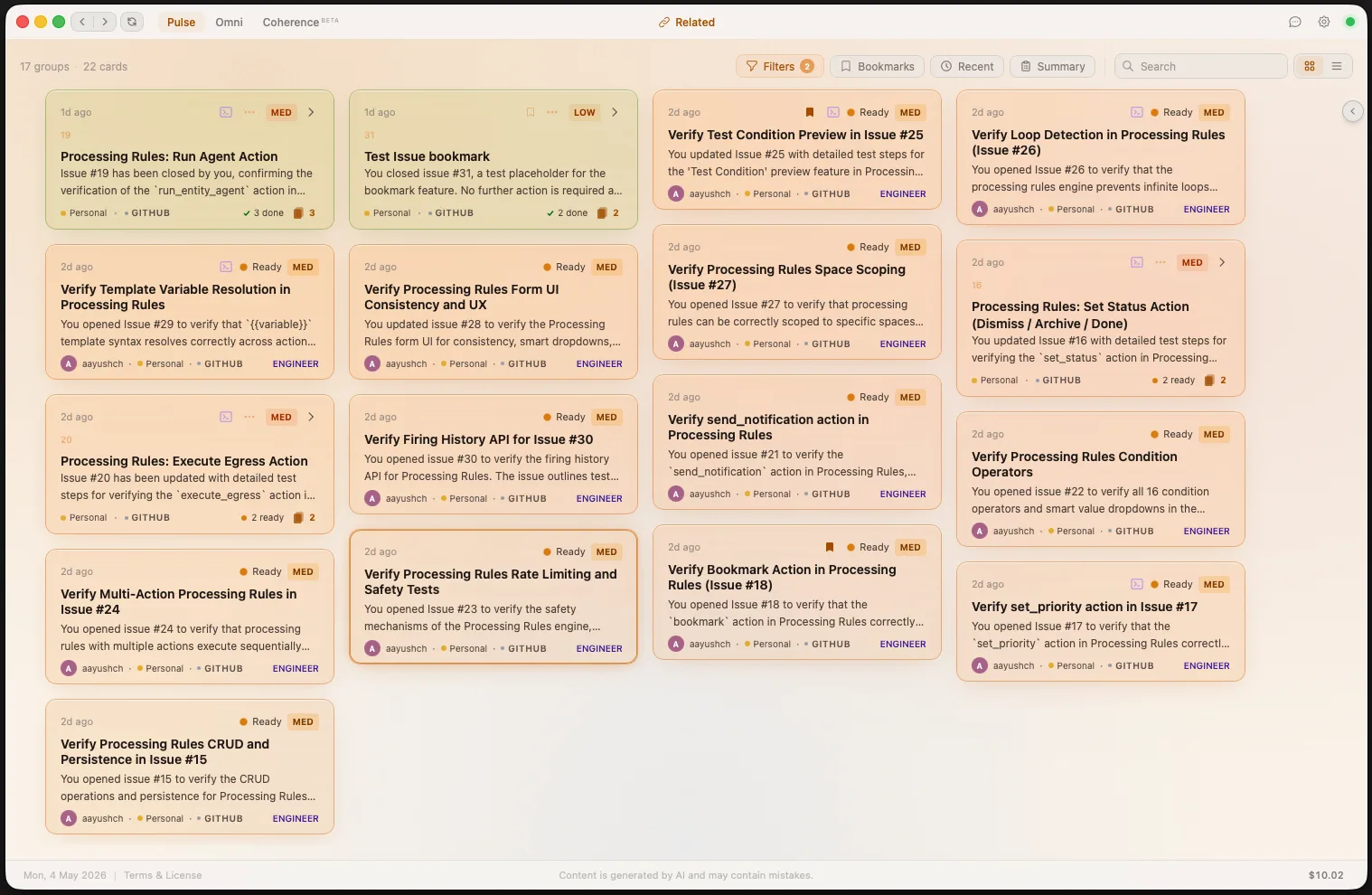
  • Semantic matching with confidence thresholds (auto-confirm + LLM-confirm)
  • Manual merge and unlink via Link Dialog
  • Learning pipeline extracts grouping rules from corrections every 6 hours
  • Respects user-split decisions — never re-merges what you separated
Laya Context Association — related cards automatically grouped across platforms
Inline Agents

Launch an agent from any card

Every card in your feed has a Run Agent action. Provide an optional focus prompt and start the agent instantly — no context switching, no setup. The card's intelligence report and related entities are automatically injected as context.
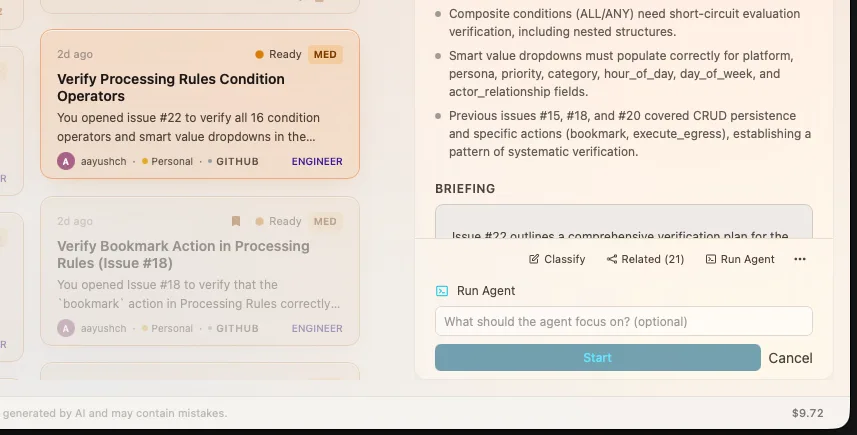
  • One-click agent trigger from any card detail view
  • Optional focus prompt to guide the agent's investigation
  • Card context and related entities injected automatically
  • Live progress streaming via workspace timeline
Laya Run Agent — launch a coding agent directly from card detail view
Agent Studio

Full control over your agent sessions

For complex tasks, the Agent Studio gives you full control. Choose your agent runtime, select an execution mode, configure working directories, attach reference files, and write detailed prompts — all before the agent starts.
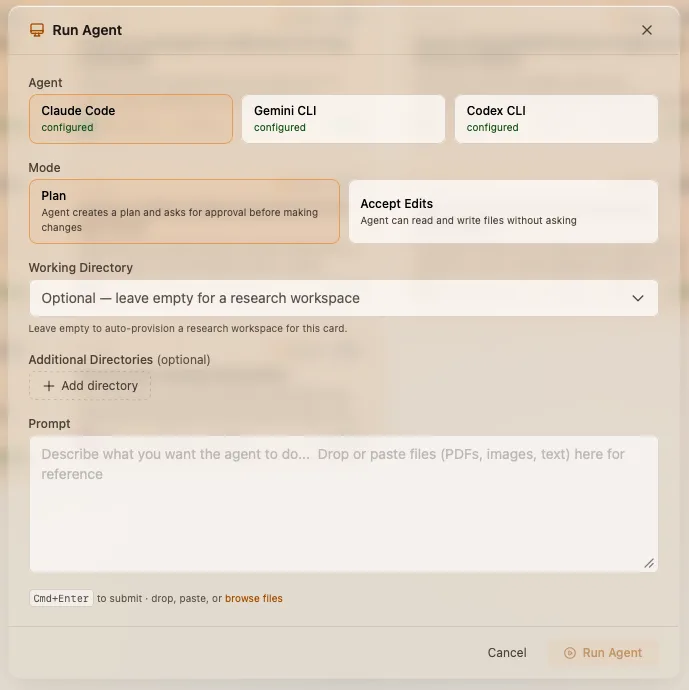
  • Choose from Claude Code, Gemini CLI, or Codex
  • Plan mode for review-first workflows, or Accept Edits for autonomous execution
  • Configure working directories and attach reference files
  • Auto-provisioned research workspaces for investigation tasks
Laya Agent Studio — configure agent runtime, mode, and prompt before launching
Composer

One interface for every outbound action

The Composer lets you execute actions across all connected platforms from a single modal. Send emails, post Slack messages, comment on Jira tickets, create GitHub issues, and more — with AI-assisted drafting and full preview before sending.
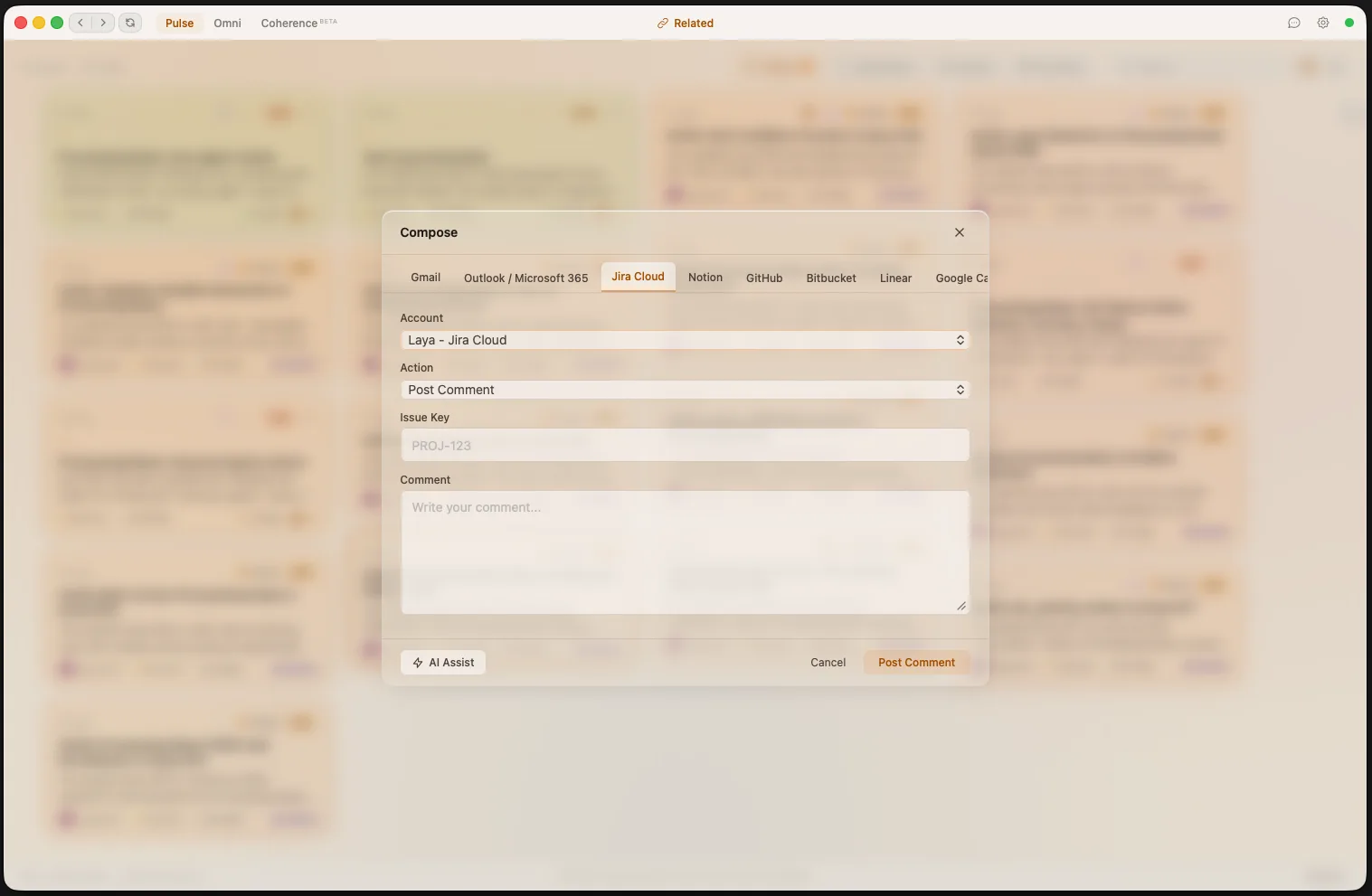
  • 9 platform backends: Gmail, Outlook, Jira, Notion, GitHub, Bitbucket, Linear, Calendar, and more
  • AI Assist generates context-aware drafts from your card data
  • Per-platform action types — compose email, post comment, create ticket
  • Multi-account support with connection health monitoring
Laya Composer — unified outbound action interface across all connected platforms
Custom Prompts

Every stage is yours to shape

Laya's pipeline runs through distinct LLM stages — router, stager, the six persona workers, briefings, summaries, semantic chat, and more. Drop a markdown file into ~/.laya/prompts/ for any stage and Laya uses your prompt instead of the default. No fork, no rebuild.

  • Override 20+ pipeline stages individually — change one, keep the rest as default
  • Tune persona voices, classification rules, or briefing style to your team
  • Delete the file to revert — defaults always come back
  • Reload picked up on engine restart — version-control your prompts alongside your dotfiles
~/.laya/prompts/
├─ router.md          # classification
├─ stager.md          # action drafting
├─ engineer.md        # persona voice
├─ comms.md
├─ briefing.md        # daily digest
├─ omni.md            # rolling summary
└─ … 16 more
MCP Server

Bring Laya into any AI harness

Whenever Laya is running, a Model Context Protocol server is reachable at http://127.0.0.1:8420/mcp/sse. Grab a token from Settings → MCP and wire any MCP-compatible client — Claude Desktop, Cursor, VS Code, custom agents — straight into your live data.

  • Three scope toggles — Read, Write, Egress — gate what clients can call
  • Bearer-token auth or loopback-only mode, your call
  • Full surface: search cards, semantic search, mutate, and trigger outbound actions across all 9 connected platforms
  • Same transport powers Laya's in-app coding agents — one path, one policy
claude_desktop_config.json
{
  "mcpServers": {
    "laya": {
      "type": "sse",
      "url":  "http://127.0.0.1:8420/mcp/sse",
      "headers": {
        "Authorization": "Bearer lyat_…"
      }
    }
  }
}

Six AI personas.
Zero context switching.

Laya automatically routes each notification to the right specialist persona, so you get expert-level output every time.

Engineer

Spawns coding agents, analyzes PRs, reviews build failures, drafts code fixes, and surfaces implementation plans with full repo context.

Comms

Drafts email replies, Slack responses, and PR comments. Analyzes sender intent, checks communication history, and prepares context-aware responses.

Ops

Aggregates calendar events, manages scheduling conflicts, synthesizes meeting prep, and monitors operational updates across all platforms.

Finance

Processes invoices, expense reports, and budget updates. Flags financial anomalies and prepares cost summaries across your accounts.

HR

Handles people-related events — onboarding, leave requests, team announcements, and HR policy updates. Recognizes internal people operations.

Sales

Tracks prospects, deals, and pipeline activity. Summarizes customer interactions and flags deal-stage changes that need attention.

Connects to everything you already use

Connect one tool or all of them. Laya normalizes everything into a unified, AI-enriched event stream.

Gmail
Slack
Jira
GitHub
Bitbucket
Calendar
Outlook
Linear
Notion
More via n8n

Your data stays yours

Laya is local-first by design. Your data never leaves your machine unless you choose a cloud model.

Local-First Architecture

SQLite database, ChromaDB vectors, and all configs stored on your machine. No cloud account required.

Your Keys, Your Models

Bring your own API keys. Use Claude, GPT, Gemini, or run Ollama locally for complete air-gapped privacy.

3-Tier Privacy Classification

Sensitive content (DMs, emails) can be routed to local models only. Metadata stays separate from content.

Ready to take
command?

Laya is free and open source. Connect your first tool, run the engine, and let AI handle the rest.

Back to Home
Back to Home

Laya Documentation

Everything you need to set up, configure, and master Laya.

Overview

Laya is an open-source, local-first AI command center that intercepts notifications from your professional tools (Gmail, Slack, Jira, GitHub, Calendar, and more), processes them through a multi-stage AI pipeline, and delivers ready-to-approve Action Cards to your desktop.

By the time you open Laya, the AI has already researched context, drafted responses, classified priorities, and packaged everything into one-click actions.

Architecture at a glance: Laya consists of three components — the Engine (Python/FastAPI backend), the UI (Svelte 5/Tauri desktop app), and n8n (local Node.js integration gateway). All data stays on your machine.

Prerequisites

  • macOS, Windows, or Linux desktop
  • Node.js 18+ — required for n8n (the integration gateway). n8n is installed automatically as a local npm module.
  • Python 3.11+ — for the Laya Engine (bundled in releases)
  • An LLM provider — either a cloud API key (Anthropic, OpenAI, Google, OpenRouter) or a self-hosted model server like Ollama, LM Studio, or any OpenAI-compatible endpoint. No API key needed for local models.
  • OS Keychain access — macOS Keychain, Windows Credential Manager, or Linux Secret Service (for storing API keys securely)

Installation

Option A: Download Release

Download the latest release from GitHub. The desktop app bundles the Engine and automatically installs n8n on first launch.

Option B: Build from Source

# Clone the repository
git clone https://github.com/your-org/laya.git
cd laya

# One-time setup (installs Python deps, Node deps, and n8n)
./scripts/setup-dev.sh

# Run the app (starts Engine + Tauri dev server + n8n)
./scripts/dev.sh

If you prefer to run each step manually instead of using the scripts above:

# Install n8n locally
mkdir -p ~/.laya/n8n_module ~/.laya/n8n
npm install --prefix ~/.laya/n8n_module n8n

# Start the Engine
cd engine
python -m venv .venv && source .venv/bin/activate
pip install -r requirements.txt
python -m laya.main

# Start the UI (in a separate terminal)
cd ui
npm install
npm run dev

First Run

When Laya starts for the first time, it automatically:

  1. Creates the ~/.laya/ directory with default config files
  2. Detects Node.js and installs n8n locally (into ~/.laya/n8n_module/)
  3. Starts n8n as a local process on port 45678
  4. Initializes the SQLite database and runs all migrations
  5. Sets up ChromaDB for semantic search
  6. Bootstraps n8n (creates admin account, imports workflows)
  7. Auto-detects installed coding agent CLIs
  8. Opens the Setup Wizard in the UI

Setup Wizard

The 5-step onboarding wizard walks you through initial configuration:

  1. LLM Provider — Enter a cloud API key (Anthropic, OpenAI, Google, OpenRouter) or connect a self-hosted model server (Ollama, LM Studio, or any OpenAI-compatible endpoint)
  2. n8n Check — Detects Node.js, installs n8n locally if needed, and auto-configures it
  3. Coding Agent + Repo — Select an agent (Claude Code, Gemini CLI, or Codex) and add your first repository
  4. Team Setup — Add team members so Laya can recognize actors in events
  5. Rules — Configure basic event filtering (e.g., ignore bot messages)

How n8n Works with Laya

n8n is the integration gateway that connects Laya to your external services. It runs as a local Node.js process on port 45678 and handles all platform-specific communication.

There are two types of n8n workflows:

  • Ingestion workflows — Listen to external services (Gmail, Slack, Jira, etc.) and forward normalized events to the Laya Engine at POST http://127.0.0.1:8420/events
  • Executor workflows — Receive action payloads from Laya and execute them on the target platform (send an email, post a Slack message, create a Jira comment)

n8n Local Installation

n8n runs as a local Node.js process. The Tauri desktop app manages the n8n lifecycle automatically (starts on app launch, stops on quit).

SettingValue
Port45678 (avoids conflict with a user's own n8n on default 5678)
Installation path~/.laya/n8n_module/ (installed via npm)
n8n binary~/.laya/n8n_module/node_modules/.bin/n8n
Data directory~/.laya/n8n/ (N8N_USER_FOLDER)
Default admin emaillaya@local.host
Default admin passwordLayaAutoAdmin2026!

If you're building from source, the setup script installs n8n for you:

# Automatic (via setup script)
./scripts/setup-dev.sh

# Manual installation
mkdir -p ~/.laya/n8n_module ~/.laya/n8n
npm install --prefix ~/.laya/n8n_module n8n

Lightweight footprint: n8n runs as a simple Node.js process — no containers, no VMs. It starts fast, uses minimal memory, and is easy to debug.

Auto-Provisioning

On startup, the Tauri app starts n8n as a local process, then the Engine provisions it automatically:

  1. Tauri detects Node.js and starts ~/.laya/n8n_module/node_modules/.bin/n8n on port 45678
  2. Engine waits for n8n to become healthy (up to 30 seconds)
  3. Creates the admin account (or logs in if it already exists)
  4. Generates an API key with full workflow and credential scopes
  5. Imports all bundled ingestion & executor workflows from n8n/workflows/
  6. Stores the API key and admin password in the OS keychain

This process is fully idempotent — it's safe to restart and won't create duplicates. n8n is automatically stopped when you quit the Laya app.

Manual Setup

If auto-provisioning doesn't work (e.g., custom n8n instance or external server), you can configure manually:

  1. Open the n8n dashboard at http://localhost:45678
  2. Create an account and generate an API key under Settings → API
  3. In Laya, go to Settings → Integrations and enter the API key manually
  4. Import workflows from the n8n/workflows/ directory via n8n's import UI

Environment Variables

VariableDefaultDescription
N8N_URLhttp://localhost:45678Override n8n base URL
LAYA_N8N_OWNER_EMAILlaya@local.hostAdmin account email
LAYA_N8N_OWNER_PASSWORDLayaAutoAdmin2026!Admin account password

Connecting Platforms

All integrations are set up directly through the Laya UI — you never need to log into n8n. When you connect a platform, Laya automatically creates the n8n credentials, clones the appropriate ingestion and executor workflows, and activates them.

General Steps

  1. Go to Settings → Integrations
  2. Click the platform you want to connect
  3. Enter your credentials (API key or OAuth) in the modal
  4. Laya validates the credentials, provisions n8n workflows, and activates them automatically
  5. A green indicator confirms the connection is active

Multi-Account Support

You can connect multiple accounts for the same platform (e.g., "Work Gmail" and "Personal Gmail"). Each connection gets its own credentials, workflows, and event stream. Give each a unique name when connecting.

Gmail

PropertyValue
AuthOAuth2 (opens Google sign-in in your browser)
TriggerPolling (every minute, INBOX only)
ActionsSend, reply, forward emails

Requires a Google OAuth client (client ID + secret). If you haven't set one up, Laya will prompt you to enter your OAuth app credentials first, then open the Google consent screen in your browser.

Slack

PropertyValue
AuthBot Token (API key)
TriggerWebhook (real-time via Slack Events API)
ActionsSend messages, post thread replies

Enter your Slack Bot Token in the connect modal. Events arrive in real-time with channel, thread, and mention metadata.

Jira

PropertyValue
AuthAPI Token (email + token)
TriggerPolling (every minute)
ActionsAdd comments, update ticket fields

Enter your Jira email and API token. The workflow polls for recently updated issues and includes project, labels, priority, and status metadata.

GitHub

PropertyValue
AuthPersonal Access Token
TriggerWebhook (real-time)
ActionsCreate PRs, add comments

Enter your GitHub username and PAT. Supports PRs, issues, pushes, reviews, and CI checks.

Bitbucket

PropertyValue
AuthApp Password
TriggerWebhook (real-time)
ActionsCreate PRs, add comments

Handles PR events, build status changes, branch pushes, and code review requests.

Google Calendar

PropertyValue
AuthOAuth2 (opens Google sign-in in your browser)
TriggerPolling (scheduled)
ActionsCreate and update events

Uses the same Google OAuth client as Gmail. If you've already set up Gmail, the OAuth client credentials are reused automatically.

Outlook

PropertyValue
AuthMicrosoft OAuth2
TriggerPolling / Webhook (depending on Graph API config)
ActionsSend/reply emails, create/update calendar events

Covers both Outlook email and calendar. Requires a Microsoft OAuth client (client ID + secret).

Linear

PropertyValue
AuthAPI Key
ActionsCreate issues, add comments

Enter your Linear API key. Linear events are ingested and actions are executed via the GraphQL API.

Notion

PropertyValue
AuthInternal Integration Token
TriggerPolling (page updates in configured databases)
ActionsCreate pages, update properties

Create a Notion internal integration, share the relevant databases with it, and enter the integration token. Laya polls for page changes and can create or update pages via the Notion API.

Removing a Connection

To disconnect a platform, click the connection name in Settings → Integrations and select Remove. Laya will deactivate and delete the cloned workflows, remove the n8n credential, and clear the keychain entry.

Custom Workflows

Laya's built-in integrations cover the most common platforms, but you can create your own n8n workflows to ingest events from any source. The only requirement is that your workflow normalizes its output into the Laya Event format and POSTs it to the Engine.

How It Works

  1. Open the n8n dashboard at http://localhost:45678 (credentials are shown in the n8n section above)
  2. Create a new workflow with a trigger of your choice (webhook, polling, cron, etc.)
  3. Add your platform-specific nodes to fetch or receive data
  4. Add a Set node to transform the data into the Laya Event format (see schema below)
  5. Add an HTTP Request node as the final step to POST the normalized event to http://127.0.0.1:8420/events
  6. Activate the workflow

The Laya Event Format

Every event POSTed to Laya must conform to this JSON schema. The endpoint is POST http://127.0.0.1:8420/events with Content-Type: application/json.

{
  "event_id": "evt_myplatform_unique_id_here",
  "timestamp": "2026-04-05T14:30:00Z",
  "source": {
    "platform": "myplatform",
    "connection_id": "optional_workflow_or_account_id",
    "raw_event_type": "task_created"
  },
  "actor": {
    "name": "Jane Smith",
    "email": "jane@company.com",
    "platform_handle": "jsmith"
  },
  "subject": {
    "type": "ticket",
    "id": "TASK-42",
    "title": "Investigate payment timeout errors",
    "url": "https://myplatform.com/tasks/42"
  },
  "content": {
    "body": "Payment gateway timing out for EU customers since 3pm.",
    "attachments": [],
    "metadata": {
      "custom_priority": "high",
      "project": "payments"
    }
  }
}

Field Reference

FieldRequiredDescription
event_idYesGlobally unique ID. Use a deterministic format (e.g., evt_{platform}_{item_id}_{timestamp}) so retries are deduplicated.
timestampYesISO 8601 UTC timestamp of when the event occurred in the source system.
source.platformYesShort name for your platform (e.g., "notion", "trello", "pagerduty"). Use lowercase, no spaces.
source.connection_idNoIdentifier for the specific account or workflow. Used by Laya to resolve which Space the event belongs to.
source.raw_event_typeYesPlatform-specific event type (e.g., "task_created", "alert_fired"). Preserved for classification and debugging.
actor.nameYesDisplay name of the person or system that triggered the event.
actor.emailYesEmail address. Laya uses this to match against your Team Directory and determine the actor's relationship (teammate, manager, external, etc.). Use "" if unavailable.
actor.platform_handleNoPlatform-specific username. Used as a fallback for team matching.
subject.typeYesOne of: ticket, pull_request, build, thread, email_thread, meeting. Choose the closest match.
subject.idYesPlatform-specific identifier (e.g., "TASK-42", "#312").
subject.titleYesHuman-readable title or subject line.
subject.urlNoDirect link to the item in the source platform.
content.bodyYesMain text content (description, message body, comment text). Use "" if unavailable.
content.attachmentsNoArray of attachment URLs or filenames. Defaults to [].
content.metadataNoObject for any platform-specific fields (labels, priority, assignee, etc.). Defaults to {}. These are stored and available to the AI pipeline for enrichment.

Choosing subject.type

Pick the type that best describes the item:

TypeUse for
ticketJira issues, Linear issues, Trello cards, support tickets, tasks
pull_requestGitHub/Bitbucket PRs, merge requests, code reviews
buildCI/CD results, deployment notifications, build failures
threadSlack messages, Discord messages, chat threads
email_threadEmails, newsletters, support inbox messages
meetingCalendar events, standups, scheduled calls

The Final n8n Node

Your workflow's last node should be an HTTP Request node configured as:

SettingValue
MethodPOST
URLhttp://127.0.0.1:8420/events
Body Content TypeJSON
BodyThe normalized event object (use expressions to map fields from previous nodes)

Testing Your Workflow

You can test the event format directly from your terminal before wiring up the full workflow:

curl -X POST http://localhost:8420/events \
  -H "Content-Type: application/json" \
  -d '{
    "event_id": "evt_test_001",
    "timestamp": "2026-04-05T14:30:00Z",
    "source": {
      "platform": "test",
      "raw_event_type": "test_event"
    },
    "actor": {
      "name": "Test User",
      "email": "test@example.com"
    },
    "subject": {
      "type": "ticket",
      "id": "TEST-1",
      "title": "Test Event"
    },
    "content": {
      "body": "Testing custom workflow integration."
    }
  }'

A successful response returns HTTP 202 with:

{ "event_id": "evt_test_001", "status": "queued" }

The event will appear in your feed within seconds as the AI pipeline processes it into an Action Card.

Tip: Use deterministic event_id values based on the source data (e.g., platform + item ID + timestamp) rather than random UUIDs. This ensures that if n8n retries a delivery, Laya deduplicates it instead of creating a duplicate card.

Tip: The content.metadata field is your escape hatch for platform-specific data. Anything you put here is stored and visible to the AI pipeline — the router and stager models can use it for better classification and action suggestions. For example, including a "severity": "critical" field will help Laya prioritize the event correctly.

Views & Layouts

The Pulse is the main feed for interacting with your Action Cards. It supports two view modes accessible from the header:

  • Card View — 3-column grid of grouped cards, best for visual scanning. Context-grouped cards are clustered together automatically when smart grouping is enabled.
  • List View — Dense tabular layout, best for rapid triage of many items

Click any card to open its Detail Panel on the right, showing the full intelligence report, staged output (draft replies, code diffs), and action buttons.

Filters & Sort

The header toolbar provides comprehensive filtering:

ControlOptionsDefault
Date NavigationPrevious/Next day, Today buttonToday
Space FilterAll Spaces, or specific spaceAll Spaces
SortNewest, Priority, Persona, Category, SourceNewest
Status FilterProcessing, Ready, Needs Approval, Running, Failed, Done, DismissedAll
Priority FilterCritical, High, Medium, LowAll
ArchivedShow/hide archived cardsHidden
SearchText search with optional "Search all days" modeEmpty

Filters are persisted to the backend so they survive page reloads and app restarts. The Search all days mode searches across all dates, not just the currently selected day.

Bulk Actions

Select multiple cards and apply actions in bulk via the bulk actions dropdown:

  • Mark Done — Mark all selected cards as done
  • Dismiss — Dismiss all selected cards
  • Reopen — Reopen dismissed/done/failed cards
  • Archive / Unarchive — Bulk archive or unarchive
  • Delete — Permanently remove selected archived cards

Card Actions

Each card provides quick actions depending on its status:

ActionDescription
Mark as DoneConfirm the card is handled. Moves to done status.
DismissReject or skip the card. Optionally provide a reason (used for AI learning).
ArchiveHide from feed. Can be reopened later. Preserves original status.
ReopenBring back a dismissed, archived, or failed card for reprocessing.
Approve AgentStart a coding agent to work on the task (for requires_approval cards).
Execute ActionRun a suggested action (send email, post comment) via n8n.
Run AgentRun a coding agent (Claude Code, Gemini CLI, Codex) on the card or its entity group. Provide a custom prompt and interact via the workspace.
DeletePermanently remove an archived card and all its data.

Card Statuses

Cards flow through a lifecycle of statuses:

StatusMeaningVisual
pendingEvent received, being processed by AI pipelineAmber pulse glow
readyCard fully processed, ready for user actionWarm peach tint
requires_approvalCoding agent needs user approval before startingViolet pulse glow
agent_runningCoding agent actively working in a workspaceLavender tint
awaiting_inputAgent paused, waiting for user decisionAmber tint
doneCompleted and confirmed by userSoft emerald
failedProcessing or execution error (can be reopened)Soft red
dismissedRejected by user (can be reopened)Muted gray
archivedHidden from feed (can be reopened or deleted)Dashed border

Bookmarks

Bookmark any card for quick access later. Bookmarked cards appear across all dates and statuses when the bookmark filter is active.

  • Click the bookmark icon on any card (list view, card view, or card detail)
  • Toggle the bookmark filter in the feed header to show only bookmarked cards
  • Bookmarks persist across sessions and ignore date navigation
  • Unbookmark by clicking the icon again

Run Agent

Any card or entity group can have a coding agent run against it. Press Ctrl+A (Cmd+A on Mac) or click Run Agent on a card to open the agent dialog:

  • Custom prompt — Describe what you want the agent to do (investigate, code, research, etc.)
  • Agent selection — Choose Claude Code, Gemini CLI, or Codex (defaults to your configured agent)
  • Working directory — Defaults to ~/.laya/tmp/research/<card_id>/ for research sessions, or your repo directory for code tasks
  • Additional directories — Pass extra repo paths for the agent to access

During execution, the agent streams progress to the workspace timeline. You can:

  • Answer questions — The agent may ask for approval or clarification; respond directly in the workspace
  • Dismiss questions — Skip pending prompts without answering
  • Resume sessions — Continue a completed or paused session with a new freeform prompt
  • Browse files — View output files created during research sessions

Agent sessions can also run at the entity group level, where a single session covers all cards in a group. The agent receives a CONTEXT.md file with the group summary and card details.

Daily Briefing

Laya generates a synthesized daily briefing at your configured time (default 7:00 AM). The briefing aggregates overnight activity into three sections:

  • Events & Meetings — Calendar events and notable communications
  • Action Items — Tasks requiring your attention, ranked by priority
  • Key Updates — Important changes filtered from noise

Configure the briefing schedule under Settings → Briefing.

Coherence — Entity Search

Coherence is Laya's cross-platform entity search and lifecycle tracking feature. Access it from the Coherence tab in the main navigation.

Search for any entity — a person, ticket ID, PR number, project name — and Coherence traces its complete history across all connected platforms.

How It Works

Coherence uses a three-phase search algorithm:

  1. Discovery — Runs semantic search (ChromaDB), fuzzy/SQLite search, and entity table lookup in parallel, then merges results via Reciprocal Rank Fusion (RRF)
  2. Expansion — Fetches all cards for matched entities plus cross-references
  3. Clustering — Groups results by connected entities, orders chronologically, and auto-detects narrative chapters

Features

  • Supports identifier patterns like PR-540, BUG-123, or natural language queries
  • AI-generated narratives explain each cluster's story with chapter detection
  • Real-time narrative streaming via WebSocket
  • Remove irrelevant clusters from results, or restore them later
  • Export traces as markdown
  • Save and rerun traces as new data arrives

Traces & Narratives

Each search creates a trace that is saved for later reference. Traces contain:

  • Clusters — Groups of related entities with timelines
  • Chapters — Auto-detected lifecycle phases (Created, Discussion, Code Review, Resolved, etc.)
  • Narrative — AI-generated summary of the entity's story
  • Search metadata — Diagnostics about which search methods contributed results

Traces can be rerun to pick up new events, and exported as markdown reports.

Context Association — Semantic Grouping

Context association automatically links related cards across different platforms and entity types. When a new card is emitted, Laya searches for semantically similar existing cards and groups them together if they belong to the same real-world context.

How It Works

  1. Semantic search — New cards are compared against existing cards in ChromaDB using vector similarity
  2. Confidence thresholds — Matches below 0.20 distance are auto-confirmed; matches between 0.20–0.30 are confirmed via LLM call
  3. Context groups — Linked cards share a context_id and display a context label in the feed
  4. User overrides — Manual merge (Link Dialog) and unlink operations are respected; user-split groups are never re-merged

Smart Grouping in Feed

When smart grouping is enabled (Settings → Briefing → Smart Grouping), context-associated cards are clustered together in the feed. Cards show a "linked" badge when they belong to a context group.

Context Association — Learning Pipeline

Laya learns from your link and unlink corrections to improve future grouping accuracy. The learning pipeline runs every 6 hours and:

  1. Collects unprocessed link/unlink corrections (up to 40 per batch)
  2. Sends them to the LLM to extract generalizable rules (e.g., "bills and payment receipts for the same service should be grouped")
  3. Stores extracted rules in the context_rules table
  4. Injects these rules into future context confirmation prompts

Rules are per-space and improve automatically as more corrections are processed. View active rules and correction history in Settings → Audit Log.

Egress — Outbound Actions

The egress system handles all outbound communication with external platforms. Instead of switching to Slack or Gmail to take action, do it directly from Laya.

Supported Actions

PlatformActions
Gmail / OutlookSend, reply, forward emails
SlackPost messages, reply in threads
JiraAdd comments, update tickets
GitHub / BitbucketCreate PRs, add comments
CalendarCreate and update events
LinearCreate issues, add comments
NotionCreate pages, update properties

How to Use

  • From a card — Click "Execute" on a suggested action. Laya shows a preview before sending.
  • Compose modal — Press Ctrl+C (Cmd+C on Mac) to open the compose modal and send a new message to any connected platform.
  • Card-triggered — Approve suggested actions directly from Action Cards.

Connections

Platform connections are managed under Settings → Integrations. Each connection tracks its status, credentials (stored in your OS keychain), and available capabilities. Use the Test Connection button to verify connectivity before sending.

Omni — Rolling Summary

Omni is Laya's cross-platform summary engine. It synthesizes all professional activity across every connected platform into a single, unified "big picture" view. Access it from the Omni tab in the main navigation.

Unlike the feed (which shows individual cards) or briefings (which cover a single morning), Omni maintains a rolling summary that progressively compresses older information while keeping recent details sharp.

Temporal Layers

Every Omni snapshot is organized into four temporal layers:

LayerScopeContent
AttentionNeeds action nowAging PRs, unanswered emails, stale blockers
RecentLast 24–48 hoursSpecific details — named PRs, email threads, decisions
PeriodThis week / sprintAggregates and trends, compressed from recent items
MilestoneOlder inflection pointsReleases, team changes, architecture shifts that still matter

Each refresh re-synthesizes older layers, folding detail into aggregates: Recent → Period → Milestone → Gone. This ensures the summary stays dense and useful without unbounded growth.

Hybrid Generation

Omni uses two generation strategies to balance cost and freshness:

  • Incremental updates — When new cards arrive, they are appended to the Recent layer as structured items. No LLM call needed; updates are debounced in 10-second batches.
  • Full resynthesis — The LLM compresses all layers, folds older items, and produces a clean versioned snapshot. Three triggers can fire resynthesis:
    • Scheduled (EOD) — Runs once daily at a configurable time (default 5:00 PM in your timezone).
    • Rolling interval — Triggers every N hours (default 4). Set to 0 to disable.
    • Event threshold — Triggers after N new events since the last resynthesis (default 50). Set to 0 to disable.

Density Modes

Control how much detail each Omni snapshot contains under Settings:

ModeItems per SectionWords per ItemBest for
Compact (default)3~25One-screen glance
Standard5~40Balanced detail
Detailed8~50Comprehensive overview

Pins & Time Travel

Pins let you mark items that must survive compression. Pinned items appear in every resynthesized snapshot exactly as written, placed in the appropriate temporal layer.

Time travel — use the version slider in the Omni header to browse previous snapshots. Each resynthesis creates a new versioned snapshot, so you can see how your summary evolved over time.

Drill-Down

Click on any item's source card links to open the Insight view — a side-by-side panel showing full card details alongside a contextual chat interface where you can ask questions about those specific cards.

Space Awareness

Each space maintains its own independent Omni summary. Switch between spaces using the tabs at the top of the Omni page.

Omni Settings

Configure under Settings:

SettingDefaultDescription
Resynthesis Time17:00Daily scheduled resynthesis time (HH:MM, local timezone)
DensitycompactSummary detail level: compact, standard, or detailed
Rolling Interval4 hoursTrigger resynthesis every N hours (0 to disable)
Event Threshold50Trigger resynthesis after N new events (0 to disable)

AI Models

Laya uses multiple AI models for different pipeline stages. Configure under Settings → Models.

Pipeline Roles

RolePurposeRecommendation
RouterFast classification (priority, category, persona)Use a fast, cheap model
StagerSynthesize action cards, intelligence reports, and Omni summariesUse a capable model
ChatConversational responses in chat interfaceUse a conversational model
CoherenceCross-platform entity search and narrative generationUse a capable model

Supported Cloud Providers

ProviderModel FormatExample
Anthropicanthropic/model-nameanthropic/claude-sonnet-4-6
OpenAIopenai/model-nameopenai/gpt-4o
Googlegemini/model-namegemini/gemini-2.0-flash-exp
OpenRouteropenrouter/provider/modelopenrouter/openai/gpt-4-turbo

Advanced Pipeline Settings

SettingDefaultDescription
Model Timeout480sMaximum wait time for LLM API responses
LLM Retries3Retry attempts for failed LLM calls (exponential backoff)
Event Queue Retries3Max retries for failed event processing
Concurrency4Number of events to process simultaneously
Summary Debounce30sQuiet period before incorporating new cards into the daily summary
Group Summary Debounce15sQuiet period per entity before updating the group summary
Event Batch Window3sCollection window before batch-routing multiple events. Set to 0 to disable.
Event Batch Max Size10Maximum events classified in one router call

Self-Hosted Models

Laya supports self-hosted model providers. Add them under Settings → Models → Local Providers.

Supported Provider Types

TypeSoftwareDefault URLAuto-Discovery
lmstudioLM Studiohttp://localhost:1234Rich metadata with capabilities
ollamaOllamahttp://localhost:11434Basic model list
openai_compatiblevLLM, LMStack, etc.CustomStandard OpenAI format

After adding a provider, its models appear in the model selection dropdowns. Use them like: my-provider-id/model-name.

Tip: Use the Test Connection button to verify provider connectivity and check model capabilities (tool calling, structured output, vision).

Coding Agents

Laya can spawn real coding agent CLIs to work on tasks in your repositories. Configure under Settings → Agent.

Supported Agents

AgentBinaryProvider
Claude CodeclaudeAnthropic
Gemini CLIgeminiGoogle
Codex CLIcodexOpenAI

Execution Modes

  • Requires Approval (recommended) — Card status becomes requires_approval; you must click "Approve" before the agent starts
  • Automatic — Agent runs immediately when an ENGINEER card is ready (use with caution)

Agent paths are auto-detected on startup. If detection fails, specify the binary path manually in settings.

Spaces & Sources

Spaces let you organize your workflow into separate contexts (e.g., Work, Personal, Side Projects). Configure under Settings → Spaces.

What Spaces Control

  • Event routing — Events from assigned sources land in the correct space
  • Feed filtering — Filter the feed by space in the header toolbar
  • Model overrides — Each space can use different AI models
  • API key overrides — Each space can have its own provider API keys
  • Repository assignment — Link repos to spaces for coding agent context
  • Pause/resume — Temporarily stop all ingestion for a space

Default Space: A "Default" space always exists and cannot be deleted. Unknown or unassigned sources automatically land here.

Source Management

Sources are n8n workflows linked to spaces. When an ingestion workflow sends an event, Laya resolves the space via the workflow ID (source.connection_id). You can reassign sources between spaces at any time under the Spaces settings.

Rules & Filters

Rules let you automatically filter incoming events before they hit the AI pipeline. Configure under Settings → Rules.

Rule Structure

Each rule has a condition and an action:

  • Drop — Discard the event silently
  • Allow — Bypass remaining rules and allow the event through

Rules are evaluated in order. The first matching rule determines the outcome. If no rule matches, the event passes through.

Available Fields

actor.email          actor.name           actor.platform_handle
source.platform      source.connection_id source.raw_event_type
subject.type         subject.id           subject.title
content.body         content.metadata.*

Operators

OperatorBehavior
equalsCase-insensitive exact match
not_equalsNegation of equals
containsSubstring match (case-insensitive)
starts_withPrefix match
ends_withSuffix match
inList membership

Examples

// Ignore all bot messages
{ "field": "actor.email", "operator": "contains", "value": "bot" } → drop

// Ignore a specific Slack channel
{ "field": "content.metadata.slack_channel", "operator": "equals", "value": "#random" } → drop

// Always allow critical priority
{ "field": "priority", "operator": "equals", "value": "CRITICAL" } → allow

Classification Feedback & Learned Rules

Laya learns from your corrections. When you change a card's priority or persona, the correction is logged. After enough corrections accumulate (15+), Laya's learning pipeline extracts generalizable rules from the patterns.

  • Manual rules — Created by you in Settings → Rules
  • Learned rules — Automatically extracted by the AI from your correction patterns

Both manual and learned rules are injected into the router prompt to improve future classifications. Over time, Laya requires fewer corrections as it learns your preferences.

Team Directory

The team directory helps Laya recognize actors in events and understand organizational relationships. Configure under Settings → Team.

FieldDescription
NameDisplay name
EmailEmail address (used to match event actors)
RoleJob title or function
Relationshipmanager, teammate, direct_report, peer, or external

When an event arrives, the Engine matches actor.email against the team directory to enrich context with role and relationship information.

Repositories

Add your code repositories so coding agents can operate in the right context. Configure under Settings → Repos.

  • Use the Browse button to select a local directory
  • Laya auto-detects the platform (GitHub, Bitbucket) and remote ID
  • Assign repos to Spaces so the right agent gets the right context

Features & Scheduling

Configure feature toggles and scheduling under Settings → Features.

Daily Briefing

SettingDefaultDescription
EnabledOnToggle briefing generation
Time07:00Time of day (24-hour format)
TimezoneAmerica/New_YorkIANA timezone (46 timezones available)

Context Association

SettingDefaultDescription
EnabledOnToggle automatic semantic grouping of related cards

Group Summaries

SettingDefaultDescription
EnabledOnToggle rolling LLM summaries for multi-card entity groups

Appearance

Customize Laya's visual style under Settings → Appearance.

SettingDefaultDescription
ThemeDarkSwitch between Dark (warm-tinted dark grays) and Light (warm cream background with inverted surface scale)
Glass effectOffFrosted glassmorphism overlay with backdrop blur on cards, tooltips, and menus
Card colorsOnEnable color-coded card borders based on priority or persona
Accessible colorsOffShift color hues for improved contrast and color-blind accessibility
Card descriptionsOnShow card description text in feed views
Card sizeDefaultToggle between compact and relaxed card layout
Font scale14 (Default)Adjust font size: Compact (12), Default (14), Relaxed (15), Large (16)
Reduced motionOffDisable animations for motion-sensitive users

All preferences are stored in localStorage and applied instantly.

Budget & Costs

Track and control LLM spending under Settings → Budget or the Dashboard.

FeatureDescription
Feature breakdownCosts grouped by feature: Pulse, Coherence, Omni, Chat, Briefing, Egress, System
Step breakdownExpandable per-feature cost details: Routing, Entity Resolution, Context Learning, Stager, Trace, etc.
Monthly historyMonthly cost aggregation with trend tracking
Monthly capSet a maximum monthly spend. When exceeded, Laya pauses AI processing and notifies you.
Pause/ResumeManually pause or resume AI processing to control costs

The Dashboard includes an interactive Feature Cost Chart that visualizes costs by feature with expandable step-level details.

Data & Retention

Configure how long Laya retains historical data under Settings → Data.

SettingDefaultApplies to
Card Retention90 daysCards in terminal states: archived, dismissed, done, failed
Chat Retention90 daysIdle chat conversations
Audit Retention90 daysAudit log entries
Omni Retention30 daysOmni snapshots (latest per space is always preserved)

A housekeeping task runs daily at ~00:00 UTC to remove expired data. Active cards and recent conversations are never auto-deleted.

Privacy Tiers

Laya classifies event data into three privacy tiers:

TierSourcesProcessing
Tier 1 (Metadata)All sourcesAlways cloud-processable
Tier 2 (Default)Jira, Bitbucket, Slack channels, CalendarCloud OK with audit trail
Tier 3 (Sensitive)Gmail, Outlook, Slack DMsWarning or local-only

Tier 3 Processing Modes

  • cloud_with_warning (default) — Allow cloud models but show a privacy indicator on the card
  • local_only — Force all Tier 3 data through local models only (e.g., Ollama)

API Key Storage

All API keys are stored in your operating system's keychain, never in config files or environment variables:

  • macOS — Keychain Access (service: laya-engine)
  • Windows — Credential Manager
  • Linux — Secret Service / Pass

On engine startup, keys are loaded from the keychain into memory. They never touch disk in plaintext.

Local-Only Mode

For maximum privacy, you can run Laya entirely without cloud models:

  1. Install Ollama or LM Studio locally
  2. Add the local provider under Settings → Models → Local Providers
  3. Set all model roles (Router, Stager, Chat) to local models
  4. Set tier3_processing to local_only

In this mode, no data ever leaves your machine — complete air-gapped privacy.

Processing Pipeline

Every event flows through Laya's multi-stage AI pipeline:

  1. INGEST — Parse event, resolve actor from team directory, store raw event, resolve space
  2. RULES — Evaluate user-defined filter rules; drop or pass
  3. ROUTER (Fast LLM) — Classify priority, category, persona; extract entities; build research plan; query memory for related events
  4. WORKERS (6 Specialized Personas) — Engineer (code analysis, agent spawning), Comms (draft replies), Ops (calendar synthesis), Finance (invoices, budgets), HR (people ops), Sales (pipeline tracking)
  5. STAGER (Strong LLM) — Synthesize research + drafts into polished card; generate intelligence report; prepare suggested actions
  6. EMIT — Store card in database, embed summary in ChromaDB, attempt context association with related cards, trigger group summary, push to UI via WebSocket
  7. GROUP SUMMARY — Generate or update rolling LLM summaries for multi-card entity groups (fire-and-forget background task)
  8. TRACE — Index entities into ChromaDB for Coherence search
  9. LEARN — Extract classification rules from user feedback (priority/persona corrections)
  10. CONTEXT LEARN — Extract context grouping rules from user link/unlink corrections (runs periodically)
  11. OMNI — Append card to rolling cross-platform summary (debounced incremental update)

Every step is recorded in the Audit Log (Settings → Audit) with model used, token counts, latency, and success/failure status. Failed events retry with exponential backoff (up to 3 attempts); permanently failed events are visible in Settings → Audit Log and can be manually retried.

Event Schema

Events sent from n8n to the Laya Engine follow this schema:

{
  "event_id": "evt_unique-id",
  "timestamp": "2026-03-19T14:30:00Z",
  "source": {
    "platform": "gmail|slack|jira|github|bitbucket|calendar|outlook|linear|notion",
    "connection_id": "n8n-workflow-id",
    "raw_event_type": "platform_specific_type"
  },
  "actor": {
    "name": "Alice Smith",
    "email": "alice@company.com",
    "platform_handle": "@alice"
  },
  "subject": {
    "type": "ticket|pull_request|build|thread|email_thread|meeting",
    "id": "PROJ-123",
    "title": "Fix login timeout bug",
    "url": "https://jira.company.com/browse/PROJ-123"
  },
  "content": {
    "body": "Full event content text...",
    "metadata": { "platform_specific": "fields" }
  }
}

Configuration Files

All user configuration lives in ~/.laya/:

FilePurpose
settings.jsonMain engine configuration (models, pipeline, privacy, briefing, n8n)
team.jsonTeam member directory
rules.jsonEvent filter rules
repos.jsonRepository definitions
data/laya.dbSQLite database (events, cards, actions, audit log)
data/chromadb/ChromaDB vector store for semantic search
n8n_module/n8n npm installation (binary at node_modules/.bin/n8n)
n8n/n8n data directory (database, encryption key, credentials)
logs/Application log files

Note: All config files are created automatically on first run with sensible defaults. You can edit them directly or use the Settings UI.

Custom Prompts

Laya's AI pipeline uses system prompts at every stage — routing, staging, summarization, chat, and more. All prompts are hardcoded with sensible defaults, but you can override any of them by placing a text or markdown file in the ~/.laya/prompts/ directory.

How it works: On startup (and via the reload API), Laya scans ~/.laya/prompts/ for recognized filenames. If a file is found, its content replaces the corresponding hardcoded system prompt. If the file is missing or deleted, the built-in default is used. Laya never creates or modifies files in this directory — your custom prompts are purely additive.

Getting Started

# Create the prompts directory
mkdir -p ~/.laya/prompts

# Override the router prompt
cat > ~/.laya/prompts/router.md << 'EOF'
You are the Router for Laya. Classify incoming events with these priorities:
- CRITICAL: anything from the CEO or involving production outages
- HIGH: customer-facing issues, PRs awaiting my review
- MEDIUM: team discussions, assigned tickets
- LOW: everything else
...
EOF

# Reload without restarting the engine
curl -X POST http://127.0.0.1:8420/prompts/reload

Available Prompt Files

FilePipeline StageDescription
router.mdRouterEvent classification (category, persona, priority, entities, research plan)
stager.mdStagerSynthesize worker findings into polished Action Cards with staged actions
omni.mdOmniRolling cross-platform summary synthesis
group_summary_initial.mdGroup SummaryFirst summary for a multi-card entity group
group_summary_rolling.mdGroup SummaryRolling update when new cards arrive for an existing group
briefing.mdBriefingDaily morning briefing generation
summarizer.mdSummarizerIncremental daily running summary
summarizer_status_change.mdSummarizerUpdates the daily summary when a card's status changes
engineer.mdWorkerENGINEER persona — coding agent task preparation
comms.mdWorkerCOMMS persona — communication reply drafting
sales.mdWorkerSALES persona — customer/prospect reply drafting
hr.mdWorkerHR persona — people/hiring communication
ops.mdWorkerOPS persona — calendar prep and operational briefings
finance.mdWorkerFINANCE persona — financial event synthesis
chat.mdChatConversational chat system prompt
chat_title.mdChatConversation title generation
chat_polish.mdChatMessage polish/refinement
learner.mdLearningExtracts classification rules from user corrections
context_learner.mdLearningExtracts grouping rules from link/unlink actions
trace_narrative.mdCoherenceGenerates narrative summaries for entity traces
trace_summary.mdCoherenceGenerates concise summaries for trace clusters
trace_filter.mdCoherenceRelevance filtering for trace search results

Important Notes

  • Full replacement: A custom prompt completely replaces the built-in default for that stage. You won't automatically receive improvements to default prompts after engine updates.
  • JSON output prompts: Several prompts (router, stager, group_summary, omni, summarizer) instruct the LLM to return structured JSON. If your custom prompt omits these format instructions, the pipeline may fail to parse responses. Check the engine logs if cards stop appearing.
  • Template variable: The group_summary_initial.md and group_summary_rolling.md prompts support {timestamp} — it will be replaced with the current UTC date/time at call time. All other prompts are plain text.
  • Unrecognized files: Files that don't match a known filename are ignored. Check the engine logs for warnings about unrecognized files (e.g., a typo in the filename).

API Endpoints

EndpointDescription
GET /promptsReturns all 22 prompt keys with their override status
POST /prompts/reloadRe-scans ~/.laya/prompts/ and hot-swaps overrides without restarting

MCP Server

Laya exposes its toolset over the Model Context Protocol. Any MCP-compatible client — Claude Desktop, Cursor, VS Code, Zed, custom agents — can call into Laya to search your cards, fetch events, trace entities, run semantic search, and trigger outbound actions across all 9 connected platforms.

Transport: the MCP server is mounted on the running engine at http://127.0.0.1:8420/mcp/sse using Server-Sent Events. There is no subprocess to spawn — whenever Laya is running, the endpoint is live. The bundled Tauri app exposes it natively; no source install required. The in-app Claude Code coding agents use the same endpoint, so there is exactly one MCP path in the system.

Configuration

Open Settings → MCP in the desktop app. You'll find three controls:

  • Tool scopes — toggles for Read, Write, and Egress. Only enabled categories are exposed to MCP clients. Changes take effect on the next call (no restart).
  • Authentication — pick Bearer token (recommended) or Loopback only, no auth.
  • Token — when bearer auth is enabled, the current token is shown (with reveal / copy / rotate controls). Rotating immediately invalidates the previous token.

Available Tools

ScopeTools
Readsearch_cards, get_card, search_events, get_event, search_entities, get_entity, get_card_stats, get_recent_activity, get_cards_for_event, get_cards_by_entity, semantic_search, get_settings
Writedismiss_card, archive_card, mark_card_done, reopen_card, update_theme, update_retention, update_briefing, update_notifications, update_feed_preferences
EgressPer-platform actions for GitHub, Bitbucket, Jira, Linear, Gmail, Slack, Calendar, Outlook, and Notion (send messages, post comments, create issues, schedule events, …)

Claude Desktop

Edit your Claude Desktop config (~/Library/Application Support/Claude/claude_desktop_config.json on macOS, %APPDATA%\Claude\claude_desktop_config.json on Windows) and add Laya as an SSE server:

{
  "mcpServers": {
    "laya": {
      "type": "sse",
      "url": "http://127.0.0.1:8420/mcp/sse",
      "headers": {
        "Authorization": "Bearer lyat_…"
      }
    }
  }
}

Copy the bearer value from Settings → MCP. Restart Claude Desktop — Laya's tools appear in the picker as mcp__laya__*. If you've set auth mode to none, omit the headers block entirely.

Cursor & VS Code

Both Cursor and the VS Code MCP extension accept the same SSE config shape. Add a server entry under mcpServers (Cursor: ~/.cursor/mcp.json; VS Code: workspace .vscode/mcp.json or the MCP extension's settings UI) with "type": "sse", the SSE URL, and (when bearer auth is on) the Authorization header.

Scoping to a Space

Append ?space_id=<your-space> to the SSE URL to restrict all tool calls in that connection to a single Laya space:

{
  "mcpServers": {
    "laya-work": {
      "type": "sse",
      "url": "http://127.0.0.1:8420/mcp/sse?space_id=work",
      "headers": { "Authorization": "Bearer lyat_…" }
    }
  }
}

Register the same MCP server multiple times under different names with different space_id values to give a client scoped views of each space.

Tuning Parameters

Laya exposes internal parameters that control the behavior, sensitivity, and resource usage of its AI pipeline. These have sensible defaults and do not need to be changed for normal operation. Advanced users can override them via the tuning section in ~/.laya/settings.json.

How to override: Add a tuning object to your ~/.laya/settings.json. Only include the parameters you want to change — omitted parameters use their defaults. Changes take effect on the next pipeline run (no restart required).

{
  "tuning": {
    "context_association_time_window_days": 14,
    "trace_semantic_max_distance": 0.50
  }
}

Context Association

Controls how Laya detects semantic relationships between cards from different sources.

ParameterDefaultDescription
context_association_time_window_days7Only consider cards within this many days for grouping. Lower = fewer but more relevant matches. Higher = broader but more false positives.

The distance thresholds for context association live in the smart_grouping section (not tuning):

SettingDefaultDescription
smart_grouping.auto_confirm_threshold0.12ChromaDB cosine distance below which cards are auto-grouped without LLM confirmation. Lower = stricter.
smart_grouping.confidence_threshold0.22Max distance for LLM-confirmed grouping. Cards beyond this are never grouped.

Entity Resolution

ParameterDefaultDescription
semantic_entity_threshold0.35Cosine distance threshold for semantic entity linking. Controls when entities (tickets, people, repos) are considered related across cards.
entity_search_results5Number of ChromaDB results fetched per entity during semantic resolution.

Classification Learning

Controls how Laya learns classification rules from user corrections (priority/persona adjustments).

ParameterDefaultDescription
classification_learn_threshold15Minimum unprocessed corrections per space before the learner triggers.
classification_learn_batch50Max corrections sent to the LLM in a single learning call.
classification_learn_interval_hours6How often the scheduler checks for unprocessed corrections.

Context Learning

Controls how Laya learns from user link/unlink actions to improve context grouping.

ParameterDefaultDescription
context_learn_threshold10Minimum unprocessed context corrections before the learner triggers.
context_learn_batch40Max context corrections sent to the LLM per learning call.
context_learn_interval_hours6Scheduler interval for context learning checks.
context_rules_max_injection20Max learned rules injected into the LLM confirmation prompt.
context_corrections_max_injection10Max recent user link/unlink actions injected as examples.

Trace / RAG Search

ParameterDefaultDescription
trace_search_results30Results per search strategy (identifier, semantic, entity, text, fuzzy).
trace_max_seeds20Max seed results retained after merging all search strategies.
trace_semantic_max_distance0.65Max cosine distance for semantic search in traces. Lower = fewer but more relevant.

Chat Retrieval

ParameterDefaultDescription
chat_semantic_max_distance0.60Max cosine distance for semantic search in chat context.
chat_context_items12Max context items (cards, events, entities) included in the chat prompt.

Router & Feedback

ParameterDefaultDescription
router_related_context_results3Related past cards fetched to provide context during event classification.
feedback_time_window_days30Time window for querying user feedback patterns (approval/dismissal rates).
corrections_retention_days30Days to keep processed corrections before automatic deletion.

Pipeline Debounce & Batching

Control how Laya batches LLM calls to reduce costs during burst activity. Located under pipeline.debounce in settings.json.

ParameterDefaultDescription
pipeline.debounce.daily_summary_seconds30Quiet period before processing accumulated cards into the daily summary. Higher = fewer LLM calls during bursts.
pipeline.debounce.group_summary_seconds15Per-entity quiet period before updating the group summary. Cards arriving within this window are batched into one LLM call.
pipeline.debounce.event_batch_window_seconds3Collection window for batch-routing. Set to 0 to disable (events process immediately).
pipeline.debounce.event_batch_max_size10Max events per batch-router call. Larger = more savings but higher per-call latency.

Cosine Distance Reference

Laya uses cosine distance in ChromaDB (range 0.0–1.0). The embedding model is nomic-ai/nomic-embed-text-v1.5 (768 dimensions).

DistanceMeaningTypical Use
0.00–0.10Near-identical contentSame event, different wording
0.10–0.20Very similarSame topic, closely related
0.20–0.35Moderately similarRelated topics, same domain
0.35–0.50Loosely relatedSame category, different subjects
0.50+UnrelatedDifferent domains

Keyboard Shortcuts

Laya supports keyboard shortcuts for common actions. Customize them under Settings → Keys.

ShortcutAction
Ctrl+A / Cmd+AOpen Run Agent dialog
Ctrl+C / Cmd+COpen Compose modal
Ctrl+BToggle bookmarks filter
Ctrl+LToggle chat panel
Ctrl+OGo to Omni
Ctrl+PGo to Pulse (feed)
Ctrl+FFocus search box
Ctrl+DToggle card descriptions
Ctrl+Shift+DToggle compact/relaxed layout
Ctrl+EnterSend compose form
RToggle recent items
SToggle day summary
Ctrl+[ / Ctrl+]Navigate back / forward

Troubleshooting

n8n won't connect

  • Check Node.js is installed: node --version (requires 18+)
  • Check n8n is installed: ls ~/.laya/n8n_module/node_modules/.bin/n8n
  • Check n8n health: curl http://localhost:45678/healthz
  • Manually start n8n: N8N_PORT=45678 N8N_USER_FOLDER=~/.laya/n8n ~/.laya/n8n_module/node_modules/.bin/n8n start
  • Try manual bootstrap: Settings → Integrations → Auto-Configure

Events not appearing

  • Verify the n8n workflow is active (green toggle in n8n dashboard)
  • Check n8n workflow execution history for errors
  • Verify credentials are configured in the n8n trigger node
  • Check if a rule is dropping the event (Settings → Rules)
  • Check engine logs at ~/.laya/logs/

LLM errors

  • Verify your API key is valid (Settings → Models, check green dot)
  • Check the Audit Log for specific error messages
  • Try increasing the model timeout (Settings → Models → Advanced)
  • If using local models, ensure the provider is running and accessible

Coding agent not detected

  • Ensure the CLI binary is installed and in your PATH
  • Try Auto-Detect in Settings → Agent
  • Or set the binary path manually

Export diagnostics

For debugging, use the Export Diagnostics button at the bottom of the Settings page. This creates a ZIP file containing system info, sanitized config, recent logs, and database statistics.

Back to Home

Privacy Policy

Last updated: May 2026

1. Who We Are

Laya is an open-source desktop application distributed under the Apache License 2.0. There is no company, hosted service, or data controller behind Laya. The software runs entirely on your machine. Laya's contributors do not operate servers, collect registrations, or maintain accounts on your behalf.

2. Data We Collect

Laya itself collects no personal data from you. There are no Laya-operated servers to receive data, no analytics endpoints, no crash reporters, and no telemetry transmitted to Laya's contributors.

All data that Laya processes — events from connected platforms, action cards, chat messages, embeddings, settings, and logs — is stored locally on your machine in the ~/.laya/ directory. This includes:

3. Data Sent to Third-Party LLM Providers

To classify events, generate action suggestions, power chat, and compute semantic embeddings, Laya transmits portions of your professional data to the LLM and embedding providers you configure. The data transmitted may include email content, messages, issue descriptions, PR diffs, calendar details, team member information, and any content you enter in chat or workspace interfaces.

You choose which providers receive your data. Laya supports fully local models (Ollama, LM Studio, any OpenAI-compatible local endpoint) where no data leaves your machine. If you configure cloud providers (Anthropic, OpenAI, Google, OpenRouter), your data is subject to those providers' privacy policies and data-processing terms.

Local-first recommended. When using self-hosted models, your data does not leave your machine or local network via Laya. This is the recommended configuration for sensitive data.

4. Platform Integrations

Laya connects to third-party platforms (Gmail, Slack, Jira, GitHub, Bitbucket, Calendar, Outlook, Linear, Notion, and others) using credentials you provide (OAuth tokens or API keys). These connections operate under your identity on each platform. Laya ingests events from these platforms and, with your approval, can execute actions on your behalf.

Credentials are stored in your operating system's secure credential store (macOS Keychain, Windows Credential Manager, or Linux Secret Service) and are never stored in plain text by Laya.

5. MCP Server

Laya exposes a Model Context Protocol (MCP) server on http://127.0.0.1:8420/mcp/sse while running. This local-only endpoint allows MCP-compatible clients (Claude Desktop, Cursor, VS Code, and others) to query your cards, events, entities, and execute actions through Laya.

The MCP server is bound to localhost (127.0.0.1) only and is not accessible from the network. Access is controlled via bearer token authentication (configurable in Settings → MCP) and tool scope toggles that let you restrict which capabilities are exposed. No data is transmitted externally by the MCP server itself.

6. Telemetry & Analytics

Laya does not collect, transmit, or share any usage analytics, telemetry, crash reports, or diagnostic data with Laya's contributors or any third party. Dashboard metrics (event counts, cost estimates) are computed and stored locally.

Laya bundles third-party components (ChromaDB, n8n, sentence-transformers, HuggingFace Hub client) that may emit anonymous telemetry to their respective maintainers. Laya makes a best-effort attempt to disable all such telemetry via documented opt-out flags at startup, but this cannot be guaranteed across all versions of all dependencies.

7. Cookies & Tracking

Laya is a desktop application. It does not use cookies, web beacons, tracking pixels, or any browser-based tracking technology. The only browser storage Laya uses is localStorage within its own embedded webview for UI preferences (theme, font size, tab state). This data never leaves your machine.

8. Data Retention & Deletion

All data is stored locally and you have full control over retention. You can configure automatic retention periods in Settings → Data (card retention, chat history retention, audit log retention). You can also export or delete all data at any time.

To completely remove all Laya data from your system, delete the ~/.laya/ directory. To revoke platform access, remove the corresponding connections in Settings and revoke OAuth grants on each platform's own settings page.

9. Children's Privacy

Laya is a professional productivity tool and is not directed at children under 16. By using Laya you represent that you are at least the age of majority in your jurisdiction.

10. Your Rights

Because Laya is local-first and Laya's contributors do not hold any of your data, there is no data controller to whom you need to submit access, rectification, or deletion requests. You can inspect, modify, export, or delete all data directly on your machine at any time. For data sent to third-party LLM or platform providers, your rights are governed by those providers' privacy policies.

11. Changes to This Policy

This privacy policy may be updated with new releases of Laya. The "Last updated" date at the top reflects the current version. Material changes will be noted in release notes.

12. Contact

Laya is an open-source project. For privacy-related questions, open an issue on the GitHub repository or contact the maintainer directly.

Back to Home

Terms & Conditions

Last updated: April 2026

1. About Laya

Laya is an open-source, local-first desktop application that intercepts events from professional tools (such as Jira, Slack, Gmail, Outlook, GitHub, Bitbucket, GitLab, Google Calendar, Linear, Notion, and others you may connect), classifies them using large language models (LLMs), stages suggested actions, and presents them as Action Cards for your review and approval.

Laya runs entirely on your machine. There are no Laya-operated servers, no Laya accounts to create, and no telemetry or analytics data is transmitted to Laya's developers or any third party by the application itself. Laya's developers do not operate any email, messaging, code-hosting, calendar, or other platform accounts on your behalf — every ingestion connection and every outbound action uses credentials you personally provide and operates under your own identity on each platform.

2. Data Processing & Third-Party LLMs

This is the most important section to understand. To classify events, generate action suggestions, power chat, and compute semantic embeddings, Laya sends portions of your professional data to the LLM and embedding providers you configure. The specific data transmitted on any given request depends on the event type, the persona processing it, and the prompts Laya uses, but may include:

The list above is illustrative and not exhaustive. You should assume that any content ingested from a connected platform is eligible to be transmitted to your configured LLM provider.

Laya is Local-First. Laya fully supports self-hosted LLM providers including Ollama, LM Studio, and any OpenAI-compatible endpoint. When using self-hosted models, your data does not leave your machine or local network via Laya. This is the recommended configuration.

Laya also supports cloud-hosted LLM providers such as Anthropic (Claude), OpenAI (GPT), Google (Gemini), OpenRouter, and any other OpenAI-compatible provider you configure. If you configure a cloud provider, the data described above will be transmitted to that provider's servers and will be subject to that provider's privacy policy, data-processing agreement, and terms of service.

Different LLM providers handle your data differently. Some retain inputs for abuse monitoring, some offer zero-retention or enterprise endpoints, and some may use your inputs to train or improve their models. Before configuring a cloud-hosted provider, you are responsible for reviewing that provider's current terms and selecting a plan, tier, or endpoint appropriate for the sensitivity of your data.

3. Platform Integrations & Outbound Actions

Laya connects to third-party platforms to ingest events and, with your approval, execute actions on your behalf. All outbound actions are executed exclusively through the connections you personally authorize (via OAuth or API keys you provide) and are attributed to your own account on the destination platform. Example actions include:

You are solely responsible for the content, timing, recipients, and consequences of every outbound action executed through your connected accounts, regardless of whether that action was originally suggested by an LLM, triggered by a workflow, or produced by a coding agent.

4. Manual Approval & Automatic Execution

No action is executed without your explicit approval unless you have opted into automatic execution for a specific action type, workflow, or rule. LLM-suggested actions may contain errors, hallucinations, factual inaccuracies, incorrect recipients, or otherwise inappropriate content; you are solely responsible for reviewing every staged action before approval.

If you enable automatic execution, Laya will carry out those actions on your behalf without per-action confirmation. Automatic execution amplifies the consequences of any LLM error, misclassification, or prompt-injection attempt originating in ingested content. You accept full responsibility for all actions performed under automatic execution rules you configure.

5. Credential & API Key Handling

Laya stores your API keys and OAuth tokens in your operating system's secure credential store (macOS Keychain, Windows Credential Manager, or Linux Secret Service). Credentials are never stored in plain text on disk by Laya.

API keys are transmitted only to their respective service providers. OAuth tokens are used to authenticate with the platforms you have connected. You can revoke any connection at any time from Settings, and you are responsible for revoking credentials on the originating platform as well if you wish to fully terminate Laya's access.

6. Local Data Storage & Environment Security

All Laya data is stored locally on your machine in the ~/.laya/ directory:

You own your data. You may delete the ~/.laya/ directory at any time to remove all Laya data from your system.

Because Laya stores sensitive event content, credentials, and n8n workflow data on disk, the security of that data ultimately depends on the security of your machine. You are responsible for maintaining full-disk encryption, operating-system updates, user-account access controls, endpoint protection, and physical security for any device on which you run Laya.

7. Automation Engine (n8n)

Laya bundles n8n, an open-source workflow automation tool, which runs as a local process on your machine (port 45678). n8n handles event ingestion from connected platforms and executes approved outbound actions. n8n's data and encrypted credentials are stored locally in ~/.laya/n8n/.

You may create, modify, import, or disable n8n workflows beyond those bundled with Laya. Any custom workflows you configure are your own responsibility. n8n is distributed under its own licenses and is not a product of Laya.

8. Coding Agents

Laya can optionally integrate with coding agents (such as Claude Code, Gemini CLI, or OpenAI Codex CLI) to execute development tasks on your behalf. When enabled, these agents operate in your local development environment and may:

Coding agents carry significant risk. A misinterpreted instruction, erroneous LLM output, or prompt-injection attempt can result in deleted or corrupted files, credential exposure, unintended git history rewrites, or unwanted changes to your environment. You are solely responsible for reviewing agent-proposed changes, sandboxing agent environments appropriately, and maintaining backups.

9. Telemetry & Analytics

Laya itself does not collect, transmit, or share any usage analytics, telemetry, crash reports, or diagnostic data with Laya's developers or any third party.

Laya bundles several open-source third-party components that may emit anonymous telemetry to their respective maintainers by default. Laya makes a best-effort attempt to disable telemetry in every bundled third-party component that offers an opt-out. However, this cannot be guaranteed. If you require an absolute guarantee that no network traffic leaves your machine beyond what you explicitly authorize, we recommend running Laya with an outbound firewall.

10. Cost & Billing

Laya itself is free and open-source. However, using cloud-hosted LLM, embedding, or platform providers incurs costs billed directly by those providers to your account. Laya provides cost estimation and budget controls in Settings, but these are approximations and do not constitute billing guarantees.

11. Compliance With Third-Party Platforms

You are responsible for complying with the terms of service, acceptable-use policies, data-processing agreements, and API rate limits of every platform you connect to Laya. Laya does not monitor or enforce these policies on your behalf.

You are also responsible for ensuring that your use of Laya with a given platform is permitted by your employer, organization, or any applicable data-sharing, confidentiality, or regulatory agreement covering the content on that platform.

12. Your Responsibilities

13. Disclaimer of Warranties

LAYA IS PROVIDED "AS IS" AND "AS AVAILABLE" WITHOUT WARRANTY OF ANY KIND, EXPRESS OR IMPLIED, INCLUDING BUT NOT LIMITED TO THE WARRANTIES OF MERCHANTABILITY, FITNESS FOR A PARTICULAR PURPOSE, NON-INFRINGEMENT, ACCURACY, AND UNINTERRUPTED OPERATION.

LLM-generated suggestions, classifications, summaries, and staged actions may be inaccurate, incomplete, biased, or inappropriate. You are solely responsible for reviewing all suggestions before approval.

14. Limitation of Liability

IN NO EVENT SHALL THE AUTHORS, COPYRIGHT HOLDERS, CONTRIBUTORS, OR MAINTAINERS OF LAYA BE LIABLE FOR ANY DIRECT, INDIRECT, INCIDENTAL, SPECIAL, EXEMPLARY, OR CONSEQUENTIAL DAMAGES (INCLUDING BUT NOT LIMITED TO PROCUREMENT OF SUBSTITUTE GOODS OR SERVICES, LOSS OF USE, DATA, OR PROFITS, BUSINESS INTERRUPTION, REPUTATIONAL HARM, OR REGULATORY PENALTIES) HOWEVER CAUSED AND ON ANY THEORY OF LIABILITY, WHETHER IN CONTRACT, STRICT LIABILITY, OR TORT (INCLUDING NEGLIGENCE OR OTHERWISE) ARISING IN ANY WAY OUT OF THE USE OF THIS SOFTWARE, EVEN IF ADVISED OF THE POSSIBILITY OF SUCH DAMAGE.

15. Indemnification

To the fullest extent permitted by applicable law, you agree to indemnify, defend, and hold harmless Laya's authors, copyright holders, contributors, and maintainers from and against any claim, demand, loss, liability, damage, fine, penalty, or expense arising out of or related to your use of Laya or your violation of these terms.

16. Age, Authority & Acceptance

By installing, configuring, or using Laya, you represent that you are at least the age of majority in your jurisdiction and that you have the legal capacity to accept these terms. If you are using Laya on behalf of an employer or organization, you further represent that you have the authority to bind that organization to these terms.

If you do not agree with any part of these terms, you must not install or use Laya.

17. Software Updates & Changes to These Terms

Laya may be updated from time to time. Updates may modify data formats, adjust pipeline or prompt behavior, add or remove supported platforms, and revise these terms. Continued use of Laya after an update constitutes acceptance of the then-current terms.

18. Severability & Entire Agreement

If any provision of these terms is found to be invalid or unenforceable, the remaining provisions will continue in full force and effect. These terms, together with the Apache License 2.0 under which Laya is distributed, constitute the entire agreement between you and Laya's contributors regarding your use of the software.

19. Open Source

Laya is open-source software licensed under the Apache License 2.0. You may inspect, modify, and redistribute the source code subject to the license terms. The full license text is available in the LICENSE file in the GitHub repository.